You can find the weekly hours overview at:
Navigation bar → Clock symbol (in the right section) → Show hours overview → Hours per week
Navigating between calendar weeks
Use the buttons ← CW XY, Today and CW XY →, on the left above the table, to navigate between calendar weeks.
Tabs
The tab navigation at the top of the page provides the following views:
Note: The Vacation days tab is only displayed if a vacation category is configured.
The Hours per week view shows all the time entries of the logged-in employee for a selected calendar week in a tabular display. It allows you to:
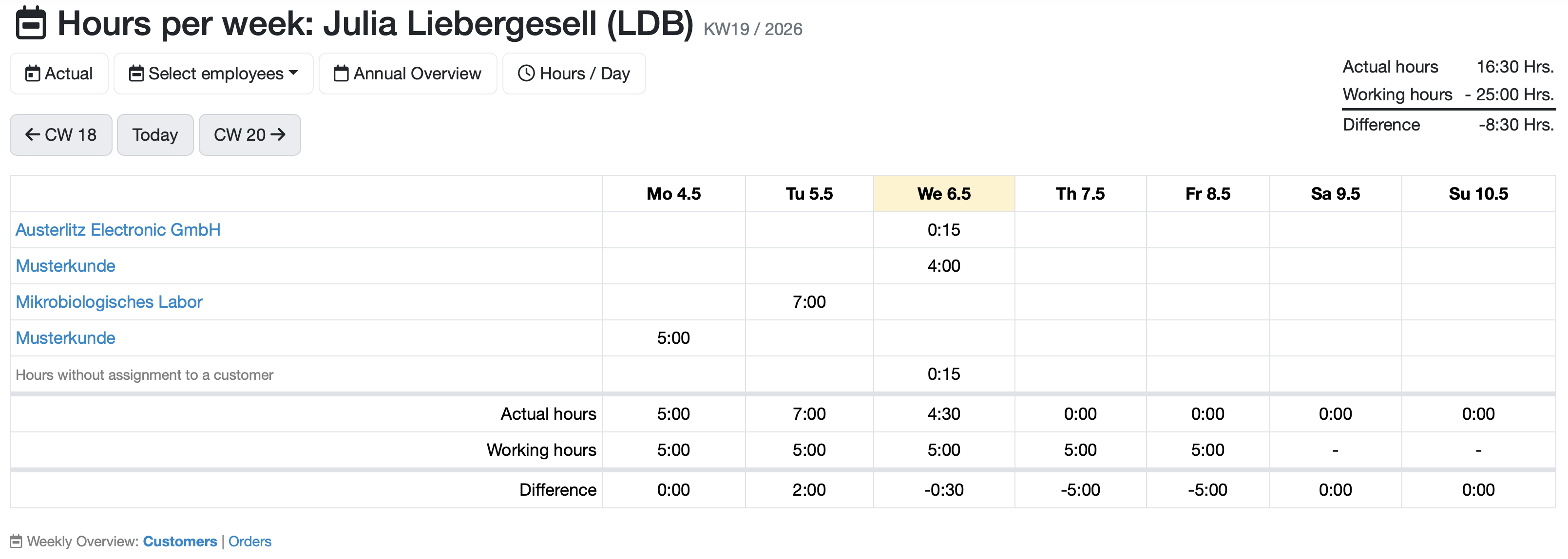
Figure: Weekly hours overview
Three summary rows are displayed at the bottom of the table:
-Use the Weekly Overview: Customers | Orders link below the table to switch the display between grouping by customers and grouping by orders. The currently active mode is displayed in bold.
##Related Topics:
Last change: 08/21/26
General information
Supplier evaluation
Material
Employees
Customers
Orders
Samples
PDF templates
Assets
Recipes
Reports
Report table editor
Interfaces
AI functions
Introductory phase
Query reports
Templates
Client zone (optional)
Offers
Invoices
Parameters
Calculating with parameters
Webservices
Transformationscode
Test plans / limit values / specifications
Documents control
Questions and answers
Equipment
Trainings
8D-report
Others
File management
Processes