Model Context Protocol (MCP)

Connect ChatGPT, Claude, and other AI assistants to your lab database

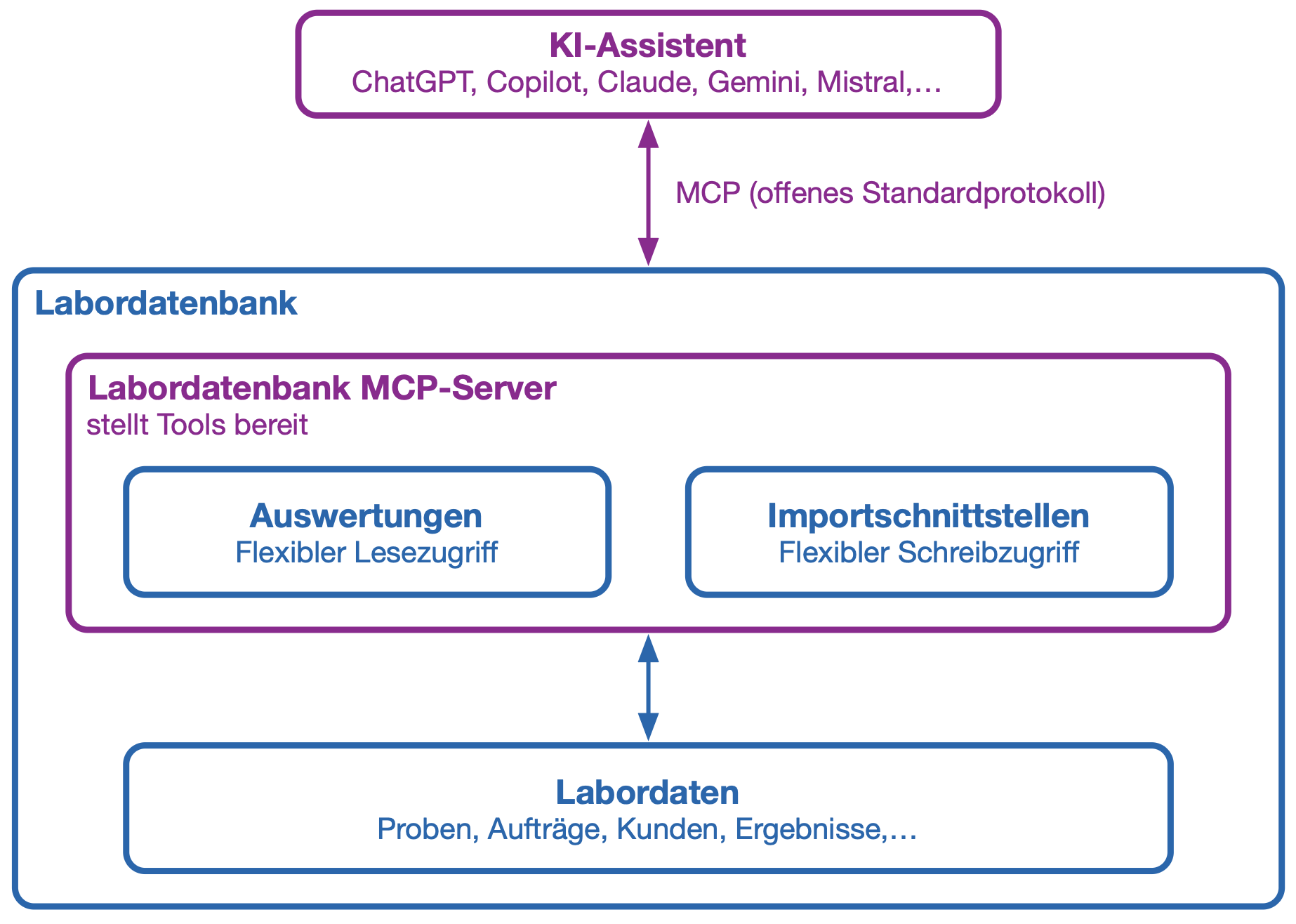
The Model Context Protocol (MCP) allows external AI applications to access specifically authorized functions of the laboratory database. This enables an AI system not only to answer questions, but also to retrieve up-to-date information, capture data in a structured manner, and execute defined workflows.

Reports are used to provide data from the lab database. New data, tasks, or status changes can be fed back into the lab database via import interfaces.

  • Unified AI Integration: MCP is an open standard and is supported by an increasing number of AI applications. This eliminates the need to develop a separate interface for each AI model.
  • Reading and Updating: AI assistants can retrieve information from approved evaluations and transfer data to the lab database via defined import interfaces.
  • Targeted Access: You decide which reports and import interfaces may be used via MCP. The AI does not have unrestricted access to the database.
  • User-Specific Access Rights: MCP login is linked to a laboratory database user. The AI application has access only to reports and import interfaces that have been enabled for that user. All changes are recorded in the audit trail under the corresponding user and are marked with “MCP.”
  • Automated laboratory workflows: Recurring queries and clearly defined work steps can be supported or automated by AI agents.
  • Flexible model selection: The MCP integration can be used with various compatible AI applications and AI models.

What is MCP?

The Model Context Protocol—MCP for short—is an open standard for connecting AI applications to external data sources and functions.

Simply put, MCP is a common language between an AI and the lab database. The AI can identify which shared tools are available, what information is required for them, and in what format the results are returned.

In the lab database, analyses can be provided as read-only MCP tools, and import interfaces as write-enabled MCP tools. This ensures that the AI operates via clearly defined interfaces rather than through direct, unrestricted database access.

MCP itself is not an AI model. It connects AI applications such as ChatGPT or Claude with the functions and data from the lab database that you make available for this purpose.

Example: Voice-Controlled Sampling

When sampling drinking water, the sampling location, time, temperature, pH value, and other observations must be documented directly on-site. In combination with an MCP-enabled AI voice application, this data collection can be performed hands-free.

For example, the sampler can dictate the values using a appropriately configured ChatGPT Voice Mode:

“Create a drinking water sample at the kitchen sampling point. Temperature 12.4 degrees, pH 7.3. No abnormalities in odor or appearance.”

The AI structures the data and transfers it to the laboratory database via the authorized MCP import interface; there, the sample is registered and a status message with the sample number is returned. The AI voice assistant reports the status and the sample number so that the sampler can label the bottle accordingly.

After sampling, the AI assistant can handle further steps:

  • Create a task for a detected deviation or a necessary follow-up inspection
  • Retrieve information about the next scheduled appointment
  • Display the next sampling location and the planned scope of testing
  • Identify missing information and request it specifically
  • Generate a brief summary of the sampling procedure

This allows you to keep your eyes on the sampling point and your hands free for the actual sampling.

Control and Security

MCP does not mean that an external AI automatically gains access to all data in the lab database. Each analysis and import interface must be specifically authorized for the user and the MCP application.

For sensitive or write-intensive actions, the AI agent being used should request confirmation before execution, which can be controlled via the corresponding MCP description.

Questions about the MCP and LIMS:

Yes. The Labordatenbank can be connected to AI applications such as Claude, ChatGPT, or Google Gemini via the Model Context Protocol (MCP). MCP is an open standard supported by all major AI providers — so the connection only needs to be set up once and then works with every supported assistant. The AI works with current data from your LIMS: it retrieves shared reports and returns new data via import interfaces. No separate programming is required for each AI application.
The Labordatenbank supports MCP. With the Fall Release, the connection will be available in production for all Labordatenbank customers from September 7, 2026 — with user-specific permissions and a complete audit trail.
MCP (Model Context Protocol) is an open standard for connecting AI applications to external systems — a common language between an AI and the Labordatenbank. For your lab, this means: you no longer need a separate interface for every AI tool. You release individual reports and import interfaces for use — controlled and fully traceable (audit trail).
No. AI applications can only access specifically released functions and reports — the AI does not get unrestricted access to the database. In addition, the Labordatenbank's user-specific access rights apply: the AI only sees what the logged-in user is themselves allowed to see. The principle of data minimization applies: only release what the AI actually needs — sensitive content can be deliberately excluded from released reports. MFA and SSO in the Labordatenbank also apply to access via MCP. AI usage is disabled by default and must be deliberately enabled by you. For details on model selection and data protection, see AI in the Labordatenbank.
All changes triggered via MCP are recorded in the audit trail under the corresponding user and are additionally clearly marked as MCP. A change made via an AI application is therefore always identifiable and attributable to a person — the same traceability as an entry made through the interface. Your release and validation steps remain unchanged. The data transmitted is used solely to answer the respective request and is not used to improve or train the models. This is documented in our General Data Security Policy (ADSR).
The MCP connection is included in the license — for all labs whose license already includes the AI integration (Enterprise Cloud + AI license), no additional costs apply. For existing customers with an older license that doesn't include AI, we offer a discounted upgrade option to the AI license, which automatically enables MCP. This discounted upgrade offer is limited and only valid until the end of 2026 — we recommend contacting your account manager now to secure the reduced price.
Activation only takes a few steps: open the report or import interface, click "Edit" under "Connection," enable the MCP checkbox, enter the displayed MCP URL in the AI assistant of your choice, and authenticate once with your Labordatenbank credentials. The AI assistant can then immediately access the released data.
In Claude (claude.ai or Claude Desktop), open Settings under "Connectors" or "Custom Connectors" and add a new connector. Enter the MCP URL of the released report or import interface from the Labordatenbank and confirm. Claude will prompt you once to sign in with your Labordatenbank credentials; the connection will then appear in the tool list and can be used directly in the chat.
No. MCP is disabled by default and must be explicitly enabled for each report or import interface, and for each user. This conservative default setting protects against unintended data access.
No SQL knowledge is required to use MCP with an AI assistant — the AI handles the database queries. SQL knowledge is only helpful if you want to create your own reports or import interfaces, which can then be released via MCP. Ready-made templates are available to help you get started.
Ready-to-use MCP templates are available for the most common use cases, including search (sample orders, customers, prices, parameters, limit values) and import (measured values, orders, customers, samples). To import them, go to: AI Integration → MCP Templates → Import Templates. The templates are then immediately available for use in the system.
MCP opens up numerous use cases for lab automation, for example: Voice-controlled sampling — an AI voice assistant takes dictation of the sampling point, temperature, pH value, and observations directly on site, creates the sample via the import interface, and reports back the sample number. Sample data maintenance — the AI retrieves the sample, customer, and order, adds missing measured values directly in the system, and fully documents this in the audit trail. Capacity and staff planning — the AI retrieves absence and vacation data and helps plan appointments or shifts with sufficient staff availability.
No. The Labordatenbank itself does not consume any tokens when operating MCP. Only the tokens of the respective AI assistant (e.g., Claude or ChatGPT) are used. If you use your own company AI gateway, your organization's own tokens are used for that.
There are three free workshops in September 2026: September 17 — Step-by-step MCP setup (for users who want to get started right away), September 18 — Introduction to reports & import interfaces (foundational knowledge required for MCP), September 25 — AI onboarding workshop (general overview of all AI features).