Model Context Protocol (MCP)

Forbind ChatGPT, Claude og andre AI-assistenter med LDB

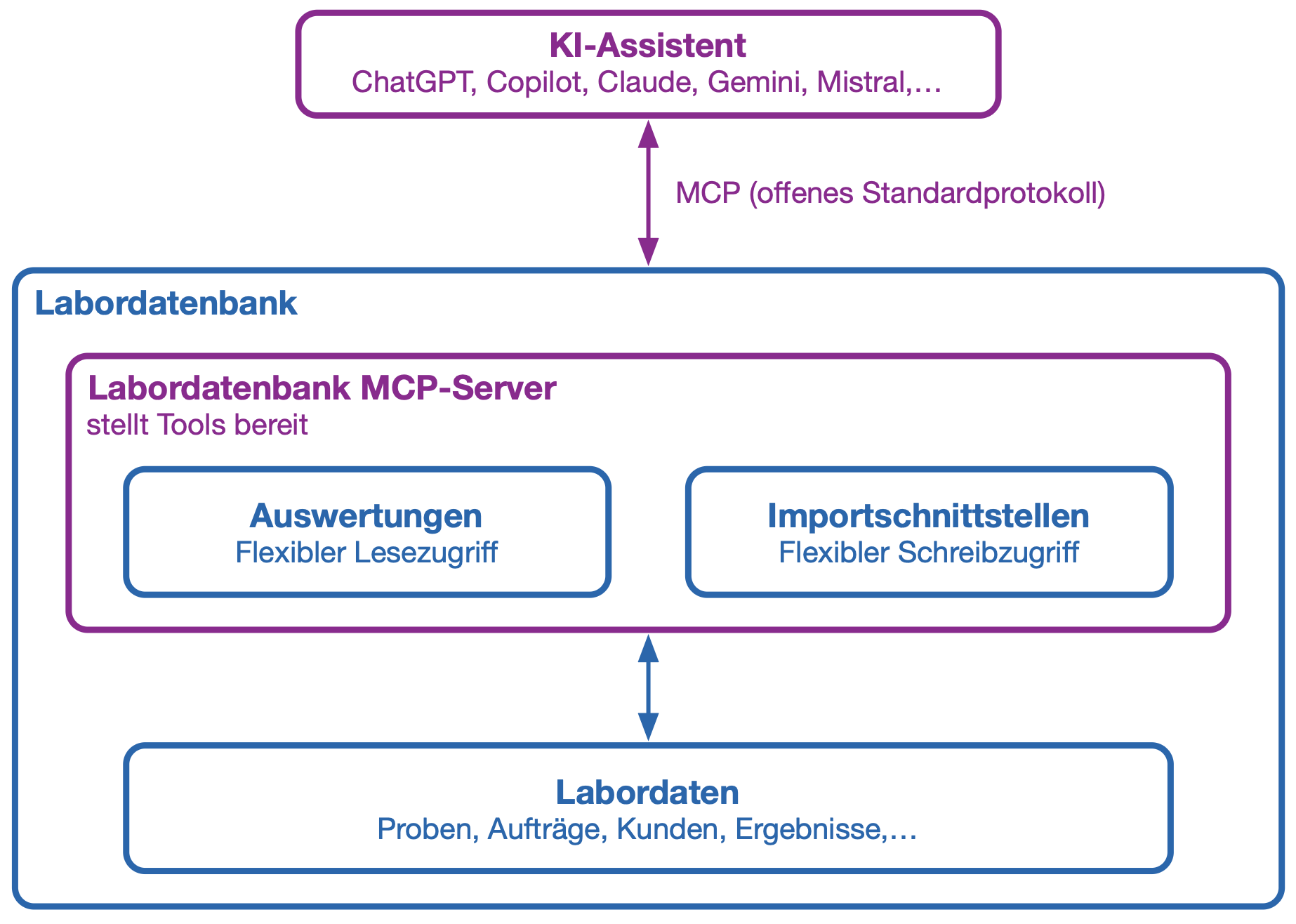
Med Model Context Protocol (MCP) kan eksterne AI-applikationer få adgang til udvalgte funktioner i LDB, som du har givet adgang til. Dermed kan AI ikke blot besvare spørgsmål, men også hente aktuelle oplysninger, registrere data struktureret og udføre definerede arbejdstrin.

Rapporter bruges til at stille data fra LDB til rådighed. Via importgrænseflader kan nye data, opgaver eller statusændringer sendes tilbage til LDB.

  • Ensartet AI-integration: MCP er en åben standard, som understøttes af stadig flere AI-applikationer. Derfor er det ikke nødvendigt at udvikle en særskilt grænseflade til hver AI-model.
  • Læsning og opdatering: AI-assistenter kan hente oplysninger via rapporter, der er givet adgang til, og sende data til LDB via definerede importgrænseflader.
  • Målrettet adgang: Du bestemmer, hvilke rapporter og importgrænseflader der må bruges via MCP. AI får ikke ubegrænset adgang til databasen.
  • Brugerspecifikke adgangsrettigheder: MCP-login er knyttet til en LDB-bruger. AI-applikationen har kun adgang til de rapporter og importgrænseflader, der er aktiveret for brugeren. Alle ændringer registreres i audit trail under den tilknyttede bruger og markeres med ”MCP”.
  • Automatiserbare laboratoriearbejdsgange: AI-agenter kan understøtte eller automatisere tilbagevendende forespørgsler og klart definerede arbejdstrin.
  • Fleksibelt modelvalg: MCP-integrationen kan bruges med forskellige kompatible AI-applikationer og AI-modeller.

Hvad er MCP?

Model Context Protocol – forkortet MCP – er en åben standard til at forbinde AI-applikationer med eksterne datakilder og funktioner.

Kort sagt er MCP et fælles sprog mellem AI og LDB. AI kan se, hvilke værktøjer der er givet adgang til, hvilke oplysninger de kræver, og i hvilken struktur resultaterne returneres.

I LDB kan rapporter stilles til rådighed som MCP-værktøjer til læsning og importgrænseflader som MCP-værktøjer til skrivning. Dermed arbejder AI via klart definerede grænseflader og ikke via direkte, ubegrænset databaseadgang.

MCP er ikke i sig selv en AI-model. Det forbinder AI-applikationer som ChatGPT eller Claude med de funktioner og data i LDB, som du giver adgang til.

Eksempel: Stemmestyret prøvetagning

Ved prøvetagning af drikkevand skal prøvetagningssted, tidspunkt, temperatur, pH-værdi og øvrige observationer dokumenteres direkte på stedet. Med en AI-stemmeapplikation, der understøtter MCP, kan registreringen foretages håndfrit.

Prøvetageren kan eksempelvis diktere værdierne via en korrekt konfigureret ChatGPT Voice Mode:

”Opret en drikkevandsprøve ved prøvetagningsstedet Køkken. Temperatur 12,4 grader, pH-værdi 7,3. Ingen afvigelser i lugt eller udseende.”

AI strukturerer oplysningerne og sender dem til LDB via den MCP-importgrænseflade, der er givet adgang til. Her oprettes prøven, og der returneres en statusmeddelelse med prøvenummeret. AI-stemmeassistenten oplyser status og prøvenummer, så prøvetageren kan mærke flasken korrekt.

Efter prøvetagningen kan AI-assistenten overtage yderligere arbejdstrin:

  • Oprette en opgave ved en konstateret afvigelse eller en nødvendig opfølgende kontrol
  • Hente oplysninger om den næste planlagte aftale
  • Vise det næste prøvetagningssted og det planlagte undersøgelsesomfang
  • Identificere manglende oplysninger og stille målrettede opfølgende spørgsmål
  • Udarbejde en kort opsummering af den udførte prøvetagning

Så kan prøvetageren holde blikket på prøvetagningsstedet og have hænderne fri til selve prøvetagningen.

Kontrol og sikkerhed

MCP betyder ikke, at en ekstern AI automatisk får adgang til alle data i LDB. Der skal gives særskilt adgang til hver rapport og importgrænseflade for både brugeren og anvendelsen via MCP.

Ved følsomme handlinger eller handlinger, der skriver data, bør den anvendte AI-agent indhente en bekræftelse, før handlingen udføres. Dette kan styres via den tilhørende MCP-beskrivelse.

Se: Generelle retningslinjer for datasikkerhed (ADSR)
Trinvis vejledning

MCP: Forbind dit LIMS med Claude og ChatGPT

Sebastian, Patrick og Konrad viser, hvordan du tilslutter din AI-assistent:

Questions about MCP integration and LIMS:

Yes. LDB connects to AI applications such as Claude, ChatGPT and Google Gemini through the Model Context Protocol (MCP). MCP is an open standard supported by all major AI providers, so you configure the connection once and can use it with any supported assistant. The AI works with current LIMS data: it retrieves enabled reports and returns new data through import interfaces. No separate programming is required for each AI application.
LDB LIMS supports MCP. With the Fall Release, the connection is available in production to all LDB customers from 7 September 2026, with user-specific permissions and a complete audit trail.
MCP (Model Context Protocol) is an open standard for connecting AI applications to external systems: a shared language between AI and LDB. Your laboratory no longer needs a separate interface for each AI tool. You enable individual reports and import interfaces, with control and traceability through the audit trail.
No. AI applications can access only functions and reports that have been specifically enabled. They do not receive unrestricted database access. LDB’s user-specific access rights also apply: the AI can see only what the signed-in user is allowed to see. Follow the principle of data minimisation by enabling only what the AI actually needs. Sensitive content can be excluded from enabled reports. LDB’s MFA and SSO also apply to MCP access. AI usage is disabled by default and must be deliberately enabled. Details on model selection and data protection are documented in our General Data Security Guidelines (ADSR).
Every MCP call is recorded in LDB against the relevant report or import interface, marked “MCP” and assigned to the user. Changes made through an AI application are therefore identifiable and attributable to a person at any time, with the same traceability as an entry made through the user interface. Your approval and validation steps remain in place. Transmitted data are used solely to answer the respective request, not to improve or train models. This is documented in our General Data Security Guidelines (ADSR).
MCP is included at no additional cost in LDB licences with AI integration. Existing customers with an older licence without AI can take advantage of a discounted upgrade to the AI licence, which automatically enables MCP.
Open the report or import interface, click “Edit” under “Connection”, enable the MCP checkbox, enter the displayed MCP URL in your chosen AI assistant and authenticate once with your LDB credentials. The assistant can then immediately access the enabled data.
In Claude (claude.ai or Claude Desktop), open the settings under “Connectors” or “Custom Connectors” and add a new connector. Enter the MCP server URL from the enabled LDB report or import interface and confirm. Claude asks you to sign in once with your LDB credentials. The connection then appears in the tool list and can be used directly in chat. See the video guide to installing LDB MCP in Claude and ChatGPT.
No. MCP is disabled by default and must be explicitly enabled for each report or import interface and each user. This conservative default protects against unintended data access.
No SQL knowledge is required to use MCP with an AI assistant: the AI handles the database queries. SQL knowledge is helpful only if you want to create your own reports or import interfaces to enable through MCP. Ready-made templates are available to get you started.
Ready-to-use MCP templates cover common use cases, including searches for sample orders, customers, prices, parameters and limit values, and imports of measurements, orders, customers and samples. Import them through System settings → AI integration → MCP templates → Import templates. The templates are then immediately available in the system.
MCP supports many laboratory automation use cases. Voice-controlled sampling: an AI voice assistant receives dictated sampling points, temperatures, pH values and observations on site, creates the sample through the import interface and reads back the sample number. Sample data maintenance: AI retrieves the sample, customer and order, adds missing measurements directly in the system and records everything in the audit trail. Capacity and staff planning: AI retrieves absence and leave data to help plan appointments or shifts with sufficient staff available.
No. MCP calls do not use AI tokens in LDB. Only the tokens of the respective AI assistant, such as Claude or ChatGPT, are used. An LDB licence with AI integration is required to use MCP.

Vi bruger egne cookies og tredjepartscookies til at vise Dem webstedet og bedre forstå, hvordan De bruger det, så vi kan forbedre de tjenester, vi tilbyder.