Model Context Protocol (MCP)

Koppla ChatGPT, Claude och andra AI-assistenter till LDB

Med Model Context Protocol (MCP) kan externa AI-tillämpningar få tillgång till specifikt godkända funktioner i LDB. Det gör att en AI inte bara kan svara på frågor, utan även hämta aktuell information, registrera strukturerade data och utföra definierade arbetsmoment.

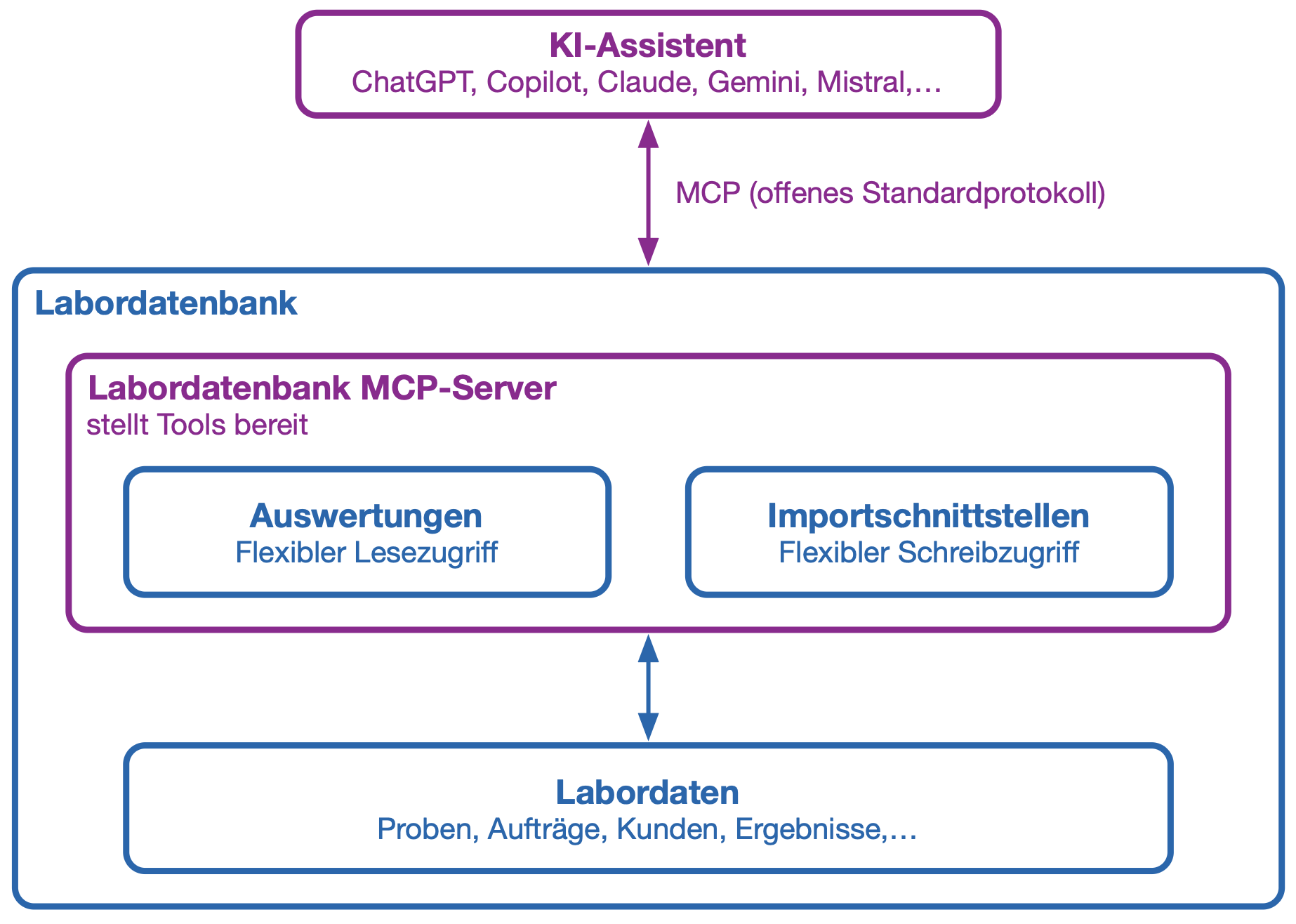
Rapporter används för att tillhandahålla data från LDB. Via importgränssnitt kan nya data, uppgifter eller statusändringar sedan skickas tillbaka till LDB.

  • Enhetlig AI-anslutning: MCP är en öppen standard som stöds av allt fler AI-applikationer. Det innebär att man inte behöver utveckla ett eget gränssnitt för varje separat AI-modell.
  • Läsa och uppdatera: AI-assistenter kan hämta information via godkända rapporter och överföra data till LDB via definierade importgränssnitt.
  • Målinriktad behörighetstilldelning: Du bestämmer själv vilka rapporter och importgränssnitt som får användas via MCP. AI:n får ingen obegränsad åtkomst till databasen.
  • Användarspecifika behörigheter: MCP-inloggningen är kopplad till en LDB-användare. AI-applikationen har endast åtkomst till de rapporter och importgränssnitt som användaren är behörig till. Alla ändringar loggas i audit trail under respektive användare och märks med "MCP".
  • Automatiserade laboratorieflöden: Återkommande sökningar och tydligt definierade arbetssteg kan underlättas eller automatiseras med hjälp av AI-agenter.
  • Flexibelt val av modeller: MCP-kopplingen kan användas tillsammans med olika kompatibla AI-applikationer och AI-modeller.

Vad är MCP?

Model Context Protocol – förkortat MCP – är en öppen standard för att koppla samman AI-applikationer med externa datakällor och funktioner.

Förenklat uttryckt är MCP ett gemensamt språk mellan en AI och LDB. AI:n kan identifiera vilka godkända verktyg som är tillgängliga, vilka uppgifter som krävs och i vilket format resultaten returneras.

I LDB kan rapporter tillhandahållas som läsande MCP-verktyg och importgränssnitt som skrivande MCP-verktyg. Därmed arbetar AI:n genom tydligt definierade gränssnitt i stället för direkt, obegränsad databasåtkomst.

MCP är i sig ingen AI-modell. Protokollet kopplar samman AI-tillämpningar som ChatGPT eller Claude med de funktioner och data i LDB som du ger behörighet till.

Exempel: Provtagning med röststyrning

Vid provtagning av dricksvatten måste provtagningspunkt, tidpunkt, temperatur, pH-värde och övriga observationer dokumenteras direkt på plats. I kombination med en MCP-kompatibel AI-röstapplikation kan registreringen ske helt handsfree.

Provtagaren kan exempelvis diktera värdena via ett anpassat ChatGPT Voice Mode:

”Skapa ett dricksvattenprov för provtagningspunkt kök. Temperatur 12,4 grader, pH-värde 7,3. Ingen anmärkning på lukt eller utseende.”

AI:n strukturerar uppgifterna och skickar dem via det godkända MCP-importgränssnittet till LDB, där provet skapas och en statusbekräftelse med provnummer returneras. AI-röstassistenten läser upp status och provnummer så att provtagaren kan märka flaskan direkt.

Efter provtagningen kan AI-assistenten ta hand om fler arbetsmoment:

  • Skapa en uppgift för en noterad avvikelse eller nödvändig uppföljande kontroll
  • Hämta information om nästa schemalagda tid
  • Visa nästa provtagningspunkt och planerad analysomfattning
  • Upptäcka saknade uppgifter och ställa relevanta följdfrågor
  • Skapa en kort sammanfattning av den genomförda provtagningen

På så sätt kan provtagaren fokusera blicken på provtagningspunkten och hålla händerna fria för själva provtagningen.

Kontroll och säkerhet

MCP innebär inte att en extern AI automatiskt får tillgång till alla data i LDB. Varje rapport och importgränssnitt måste godkännas specifikt för användaren och för MCP-användning.

Vid känsliga eller skrivande åtgärder bör AI-agenten begära en bekräftelse före verkställande, vilket kan styras via tillhörande MCP-beskrivning.

Se även: Allmänna datasäkerhetsriktlinjer (ADSR)
Steg för steg-guide

MCP: Koppla ihop LIMS med Claude och ChatGPT

Sebastian, Patrick och Konrad visar hur du ansluter din AI-assistent:

Questions about MCP integration and LIMS:

Yes. LDB connects to AI applications such as Claude, ChatGPT and Google Gemini through the Model Context Protocol (MCP). MCP is an open standard supported by all major AI providers, so you configure the connection once and can use it with any supported assistant. The AI works with current LIMS data: it retrieves enabled reports and returns new data through import interfaces. No separate programming is required for each AI application.
LDB LIMS supports MCP. With the Fall Release, the connection is available in production to all LDB customers from 7 September 2026, with user-specific permissions and a complete audit trail.
MCP (Model Context Protocol) is an open standard for connecting AI applications to external systems: a shared language between AI and LDB. Your laboratory no longer needs a separate interface for each AI tool. You enable individual reports and import interfaces, with control and traceability through the audit trail.
No. AI applications can access only functions and reports that have been specifically enabled. They do not receive unrestricted database access. LDB’s user-specific access rights also apply: the AI can see only what the signed-in user is allowed to see. Follow the principle of data minimisation by enabling only what the AI actually needs. Sensitive content can be excluded from enabled reports. LDB’s MFA and SSO also apply to MCP access. AI usage is disabled by default and must be deliberately enabled. Details on model selection and data protection are documented in our General Data Security Guidelines (ADSR).
Every MCP call is recorded in LDB against the relevant report or import interface, marked “MCP” and assigned to the user. Changes made through an AI application are therefore identifiable and attributable to a person at any time, with the same traceability as an entry made through the user interface. Your approval and validation steps remain in place. Transmitted data are used solely to answer the respective request, not to improve or train models. This is documented in our General Data Security Guidelines (ADSR).
MCP is included at no additional cost in LDB licences with AI integration. Existing customers with an older licence without AI can take advantage of a discounted upgrade to the AI licence, which automatically enables MCP.
Open the report or import interface, click “Edit” under “Connection”, enable the MCP checkbox, enter the displayed MCP URL in your chosen AI assistant and authenticate once with your LDB credentials. The assistant can then immediately access the enabled data.
In Claude (claude.ai or Claude Desktop), open the settings under “Connectors” or “Custom Connectors” and add a new connector. Enter the MCP server URL from the enabled LDB report or import interface and confirm. Claude asks you to sign in once with your LDB credentials. The connection then appears in the tool list and can be used directly in chat. See the video guide to installing LDB MCP in Claude and ChatGPT.
No. MCP is disabled by default and must be explicitly enabled for each report or import interface and each user. This conservative default protects against unintended data access.
No SQL knowledge is required to use MCP with an AI assistant: the AI handles the database queries. SQL knowledge is helpful only if you want to create your own reports or import interfaces to enable through MCP. Ready-made templates are available to get you started.
Ready-to-use MCP templates cover common use cases, including searches for sample orders, customers, prices, parameters and limit values, and imports of measurements, orders, customers and samples. Import them through System settings → AI integration → MCP templates → Import templates. The templates are then immediately available in the system.
MCP supports many laboratory automation use cases. Voice-controlled sampling: an AI voice assistant receives dictated sampling points, temperatures, pH values and observations on site, creates the sample through the import interface and reads back the sample number. Sample data maintenance: AI retrieves the sample, customer and order, adds missing measurements directly in the system and records everything in the audit trail. Capacity and staff planning: AI retrieves absence and leave data to help plan appointments or shifts with sufficient staff available.
No. MCP calls do not use AI tokens in LDB. Only the tokens of the respective AI assistant, such as Claude or ChatGPT, are used. An LDB licence with AI integration is required to use MCP.

Wir verwenden unsere eigenen Cookies und Cookies von Drittanbietern, damit wir Ihnen die Website anzeigen und besser verstehen können, wie Sie diese nutzen, um unsere angebotenen Dienste zu verbessern.