Model Context Protocol (MCP)

Yhdistä ChatGPT, Claude ja muut tekoälyavustajat LDB-järjestelmään

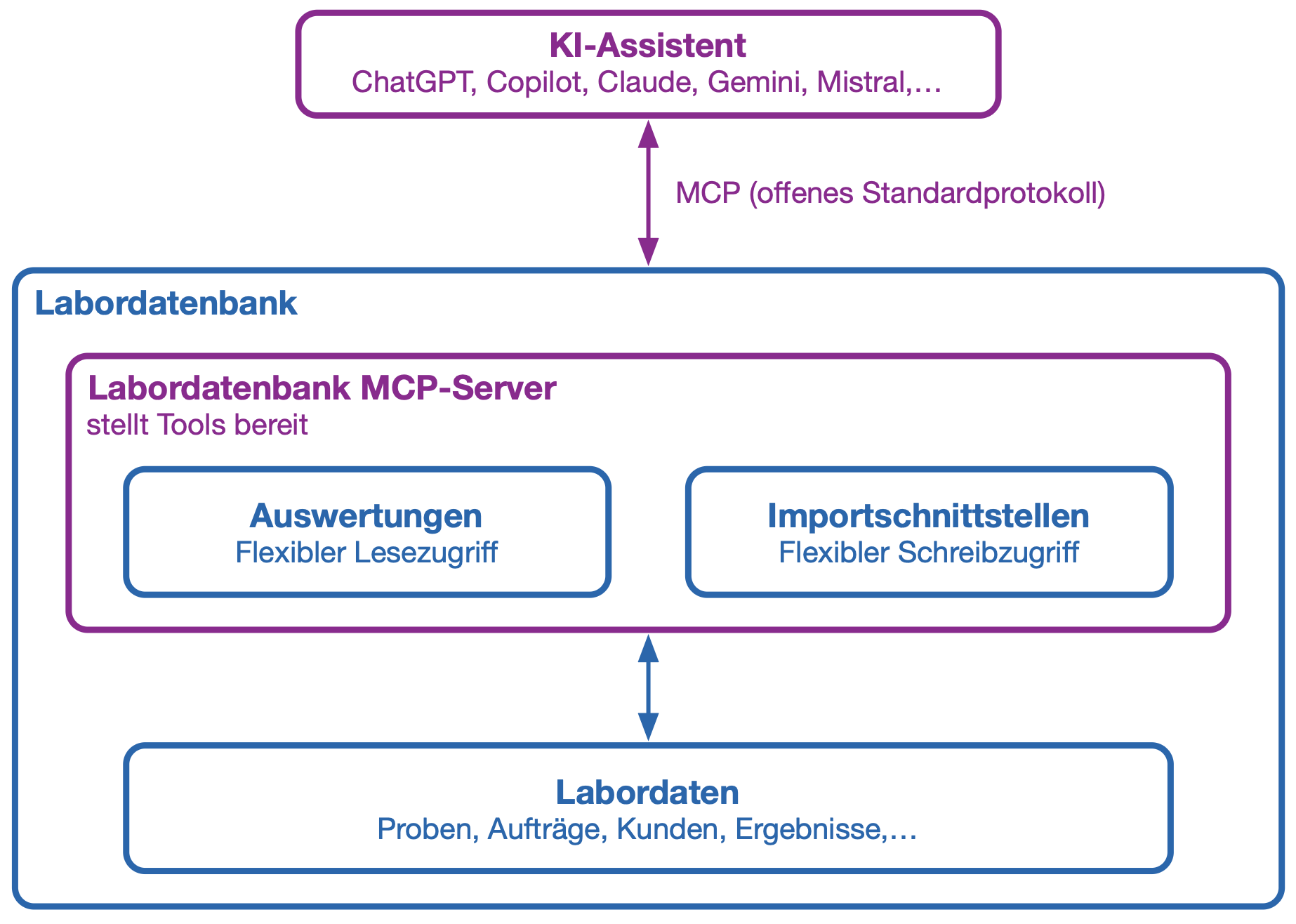
Model Context Protocolin (MCP) avulla ulkoiset tekoälysovellukset voivat käyttää erikseen sallittuja LDB-toimintoja. Näin tekoäly voi vastaamisen lisäksi hakea ajantasaisia tietoja, tallentaa strukturoitua dataa ja suorittaa määriteltyjä työvaiheita.

Raportteja käytetään tietojen tuomiseen LDB-järjestelmästä. Tuontiliittymien kautta uusia tietoja, tehtäviä tai tilamuutoksia voidaan puolestaan palauttaa takaisin LDB-järjestelmään.

  • Yhtenäinen tekoälyintegraatio: MCP on avoin standardi, jota yhä useammat tekoälysovellukset tukevat. Tämän ansiosta jokaiselle tekoälymallille ei tarvitse kehittää omaa erillistä rajapintaa.
  • Luku ja päivitys: Tekoälyavustajat voivat hakea tietoja sallittujen raporttien kautta ja siirtää dataa LDB-järjestelmään määriteltyjen tuontiliittymien välityksellä.
  • Tarkkaan rajattu käyttöoikeus: Päätät itse, mitä raportteja ja tuontiliittymiä MCP:n kautta saa käyttää. Tekoäly ei saa rajoittamatonta pääsyä tietokantaan.
  • Käyttäjäkohtaiset käyttöoikeudet: MCP-kirjautuminen on sidottu LDB-käyttäjätiliin. Tekoälysovelluksella on pääsy vain niihin raportteihin ja tuontiliittymiin, jotka kyseiselle käyttäjälle on sallittu. Kaikki muutokset tallentuvat käyttäjän lokitietoihin audit trailiin ja ne merkitään tunnisteella ”MCP”.
  • Automatisoitavat laboratoriotoiminnot: Tekoälyagentit voivat tukea tai automatisoida toistuvia kyselyitä ja selkeästi määriteltyjä työvaiheita.
  • Joustava mallin valinta: MCP-yhteyttä voidaan käyttää erilaisten yhteensopivien tekoälysovellusten ja -mallien kanssa.

Mikä on MCP?

Model Context Protocol eli MCP on avoin standardi tekoälysovellusten yhdistämiseen ulkoisiin tietolähteisiin ja toimintoihin.

Yksinkertaisesti sanottuna MCP on yhteinen kieli tekoälyn ja LDB:n välillä. Tekoäly tunnistaa, mitä sallittuja työkaluja on käytettävissä, mitä tietoja ne vaativat ja missä muodossa tulokset palautetaan.

LDB:ssä raportteja voidaan tarjota lukevina MCP-työkaluina ja tuontiliittymiä kirjoittavina MCP-työkaluina. Näin tekoäly toimii aina selkeästi määriteltyjen rajapintojen kautta eikä suoran, rajoittamattoman tietokantayhteyden välityksellä.

MCP ei itse ole tekoälymalli. Se yhdistää ChatGPT:n tai Clauden kaltaiset tekoälysovellukset niihin LDB-toimintoihin ja -tietoihin, jotka sallit käyttöön.

Esimerkki: näytteenotto puheohjauksella

Talousveden näytteenotossa näytepiste, ajankohta, lämpötila, pH-arvo ja muut havainnot on kirjattava suoraan paikan päällä. Yhdessä MCP-yhteensopivan puheohjatun tekoälysovelluksen kanssa kirjaus voidaan tehdä täysin ilman käsiä.

Näytteenottaja voi sanella tiedot esimerkiksi tarkoitukseen konfiguroidun ChatGPT Voice Mode -tilan kautta:

”Luo talousvesinäyte näytepisteelle Keittiö. Lämpötila 12,4 astetta, pH-arvo 7,3. Ei poikkeamia hajussa tai ulkonäössä.”

Tekoäly jäsentää tiedot ja välittää ne sallitun MCP-tuontiliittymän kautta LDB-järjestelmään, johon näyte luodaan ja josta palautetaan tilatieto sekä näytenumero. Puheavustaja toistaa tilatiedon ja näytenumeron, jotta näytteenottaja voi merkitä pullon heti asianmukaisesti.

Näytteenoton jälkeen tekoälyavustaja voi huolehtia seuraavista työvaiheista:

  • Tehtävän luominen havaitulle poikkeamalle tai tarvittavalle uusintatarkastukselle
  • Seuraavan suunnitellun ajanvarauksen tietojen hakeminen
  • Seuraavan näytepisteen ja suunnitellun tutkimuslaajuuden näyttäminen
  • Puuttuvien tietojen tunnistaminen ja tarkentavien kysymysten esittäminen
  • Lyhyen yhteenvedon laatiminen suoritetusta näytteenotosta

Näin katse pysyy näytepisteessä ja kädet vapaina varsinaiseen näytteenottoon.

Hallinta ja tietoturva

MCP ei tarkoita, että ulkoinen tekoäly saisi automaattisesti pääsyn kaikkiin LDB-tietoihin. Jokainen raportti ja tuontiliittymä on aktivoitava erikseen kyseiselle käyttäjälle ja MCP-käyttöä varten.

Kriittisten tai tietoja kirjoittavien toimintojen osalta tekoälyagentin tulisi pyytää vahvistus ennen toimenpiteen suorittamista, mitä voidaan ohjata siihen liittyvän MCP-kuvauksen avulla.

Katso myös: Yleiset tietoturvaohjeet (ADSR)
Vaiheittainen opas

MCP: Yhdistä LIMS Claudeen ja ChatGPT:hen

Sebastian, Patrick ja Konrad näyttävät, miten yhdistät tekoälyavustajasi:

Questions about MCP integration and LIMS:

Yes. LDB connects to AI applications such as Claude, ChatGPT and Google Gemini through the Model Context Protocol (MCP). MCP is an open standard supported by all major AI providers, so you configure the connection once and can use it with any supported assistant. The AI works with current LIMS data: it retrieves enabled reports and returns new data through import interfaces. No separate programming is required for each AI application.
LDB LIMS supports MCP. With the Fall Release, the connection is available in production to all LDB customers from 7 September 2026, with user-specific permissions and a complete audit trail.
MCP (Model Context Protocol) is an open standard for connecting AI applications to external systems: a shared language between AI and LDB. Your laboratory no longer needs a separate interface for each AI tool. You enable individual reports and import interfaces, with control and traceability through the audit trail.
No. AI applications can access only functions and reports that have been specifically enabled. They do not receive unrestricted database access. LDB’s user-specific access rights also apply: the AI can see only what the signed-in user is allowed to see. Follow the principle of data minimisation by enabling only what the AI actually needs. Sensitive content can be excluded from enabled reports. LDB’s MFA and SSO also apply to MCP access. AI usage is disabled by default and must be deliberately enabled. Details on model selection and data protection are documented in our General Data Security Guidelines (ADSR).
Every MCP call is recorded in LDB against the relevant report or import interface, marked “MCP” and assigned to the user. Changes made through an AI application are therefore identifiable and attributable to a person at any time, with the same traceability as an entry made through the user interface. Your approval and validation steps remain in place. Transmitted data are used solely to answer the respective request, not to improve or train models. This is documented in our General Data Security Guidelines (ADSR).
MCP is included at no additional cost in LDB licences with AI integration. Existing customers with an older licence without AI can take advantage of a discounted upgrade to the AI licence, which automatically enables MCP.
Open the report or import interface, click “Edit” under “Connection”, enable the MCP checkbox, enter the displayed MCP URL in your chosen AI assistant and authenticate once with your LDB credentials. The assistant can then immediately access the enabled data.
In Claude (claude.ai or Claude Desktop), open the settings under “Connectors” or “Custom Connectors” and add a new connector. Enter the MCP server URL from the enabled LDB report or import interface and confirm. Claude asks you to sign in once with your LDB credentials. The connection then appears in the tool list and can be used directly in chat. See the video guide to installing LDB MCP in Claude and ChatGPT.
No. MCP is disabled by default and must be explicitly enabled for each report or import interface and each user. This conservative default protects against unintended data access.
No SQL knowledge is required to use MCP with an AI assistant: the AI handles the database queries. SQL knowledge is helpful only if you want to create your own reports or import interfaces to enable through MCP. Ready-made templates are available to get you started.
Ready-to-use MCP templates cover common use cases, including searches for sample orders, customers, prices, parameters and limit values, and imports of measurements, orders, customers and samples. Import them through System settings → AI integration → MCP templates → Import templates. The templates are then immediately available in the system.
MCP supports many laboratory automation use cases. Voice-controlled sampling: an AI voice assistant receives dictated sampling points, temperatures, pH values and observations on site, creates the sample through the import interface and reads back the sample number. Sample data maintenance: AI retrieves the sample, customer and order, adds missing measurements directly in the system and records everything in the audit trail. Capacity and staff planning: AI retrieves absence and leave data to help plan appointments or shifts with sufficient staff available.
No. MCP calls do not use AI tokens in LDB. Only the tokens of the respective AI assistant, such as Claude or ChatGPT, are used. An LDB licence with AI integration is required to use MCP.

Wir verwenden unsere eigenen Cookies und Cookies von Drittanbietern, damit wir Ihnen die Website anzeigen und besser verstehen können, wie Sie diese nutzen, um unsere angebotenen Dienste zu verbessern.