You can find the employee management at:
Navigation bar → Settings → Manage employees.
The image shows what the employee management page looks like. The functions are described below.
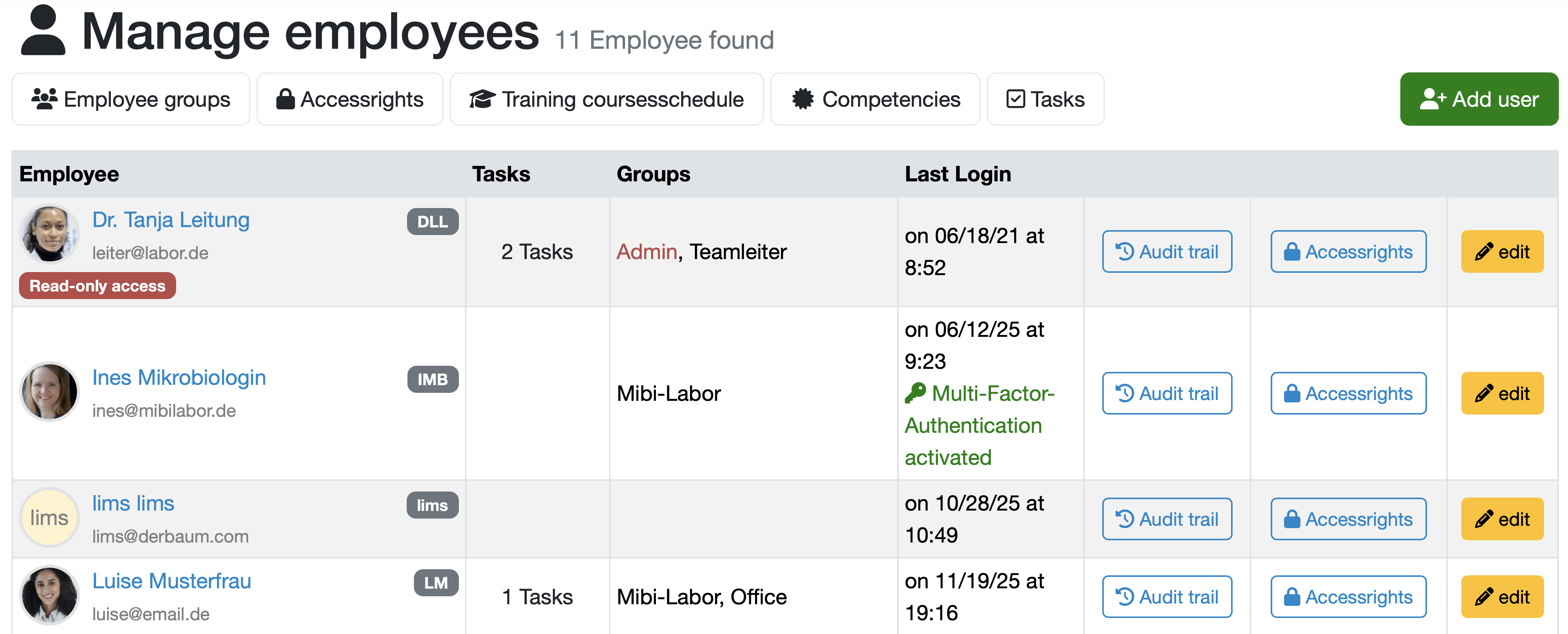
All employees are displayed in a tabular overview that includes the following columns:
Employee: Displays the profile picture, name, email address, and if applicable, an account type (e.g., Read-only access) of the respective employee.
Additionally, the respective abbreviations are shown with a gray background.
Tasks: Shows the number of open tasks for the respective employee.
Groups: Shows the employee's group membership.
Last Login: Shows the date and time of the employee's last login to the LDB. Additionally, it is shown here in green text whether Multi-Factor-Authentication activated for the login.
Actions: The last 3 columns provide quick access to the functions Audit trail, Accessrights and edit via buttons.
Note: You can only see and use those functions for which you have the corresponding Accessrights.
The following additional functions are available via the tabs at the top of the screen:
Employee groups: Management of employee groups
Accessrights: Manage access rights
Training coursesschedule: Planning and overview of training sessions
Competencies: Management of employee competencies
Tasks: Task management for employees
The management of usage licenses can also be found in the employee management. You can find this function in the upper area of the page if you have the access right Add user.
The following image shows an overview of the license management.

The usage licenses are divided into two categories: Standard licenses and Readonly licenses.
For both license types, the number of currently included usage licenses as well as the licenses already in use are displayed.
The minimum number of usage licenses is the maximum number of active users or the agreement according to the license contract.
If all currently included usage licenses are in use and you want to add another employee, you will receive a notification.
Note: Once activated, the employee can log in to the LDB again with their existing credentials.
Last change: 10/14/26
General information
8D-report
Supplier evaluation
Material
Employees
Customers
Orders
Samples
PDF templates
Assets
Recipes
Reports
Report table editor
Interfaces
AI functions
Introductory phase
Query reports
Templates
Client zone (optional)
Offers
Invoices
Parameters
Calculating with parameters
Webservices
Transformationscode
Test plans / limit values / specifications
Documents control
Questions and answers
Equipment
Trainings
Others
File management
Processes