You can find the parameter usage statistics in the menu bar under:
Settings → Manage parameters → Usage statistics

The parameter usage statistics enable you to analyze trends and developments and identify frequently and rarely used parameters over different periods of time.
Possible uses
The statistics support you in operational analysis, strategic planning, resource optimization, and quality management. They provide answers to the following questions:
The following figure shows the parameter usage statistics:
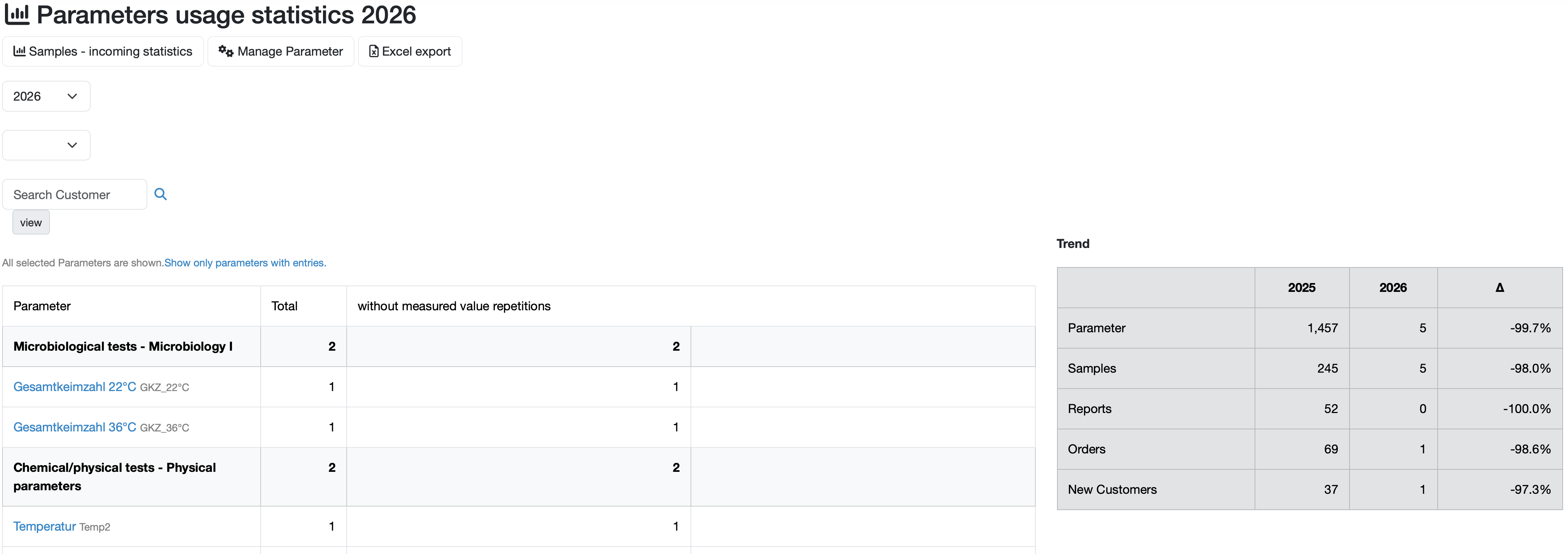
Detailed list of parameters in the left-hand area of the page:
The table in the left-hand area shows a detailed overview of the individual parameters with specific usage figures:
Development overview on the right side of the page:
Here you can see the development overview with annual comparisons and growth rates.
Filter options
You can use the drop-down selection fields to filter the display according to the following criteria:
Note: By default, all parameters selected for samples are displayed. Click on Show only parameters with entered values. to restrict the view accordingly.
Tabs
Use the tabs in the upper left area to:
Last change: 08/21/26
General information
Supplier evaluation
Material
Employees
Customers
Orders
Samples
PDF templates
Assets
Recipes
Reports
Report table editor
Interfaces
AI functions
Introductory phase
Query reports
Templates
Client zone (optional)
Offers
Invoices
Parameters
Calculating with parameters
Webservices
Transformationscode
Test plans / limit values / specifications
Documents control
Questions and answers
Equipment
Trainings
8D-report
Others
File management
Processes