Open the station management via:
Navigation bar → Samples → Stations
The functions for managing stations in the LDB are described below.
The systematic station configuration enables efficient sample tracking and optimized laboratory workflows with full traceability in your LDB. A station represents a physical storage or processing location in the lab (e.g. a freezer, a room or a storage box) and is used for checking samples in and out – also via QR code scanning.
The station enables:
Stations can be flexibly adapted to different use cases and are displayed differently depending on the configuration:
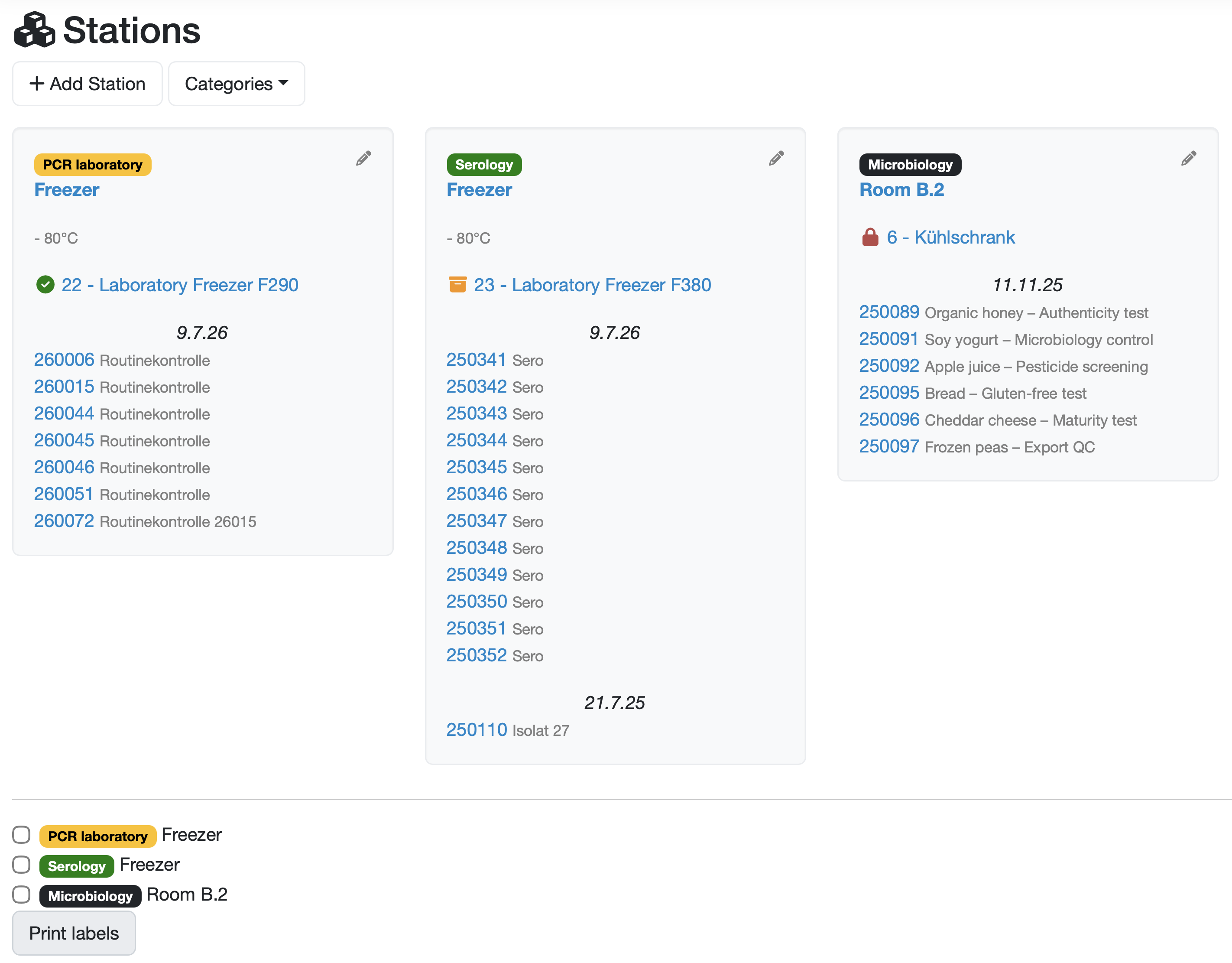
Figure: Overview of the stations with different categories and checked-in samples
The stations are displayed as tiles. The following table describes the elements of a station tile.
| Element | Description |
|---|---|
| Category | Colored label of the category for visual grouping. Configuration-dependent. |
| Station name | Name of the station highlighted in blue. Clicking on it opens the detail view of the station. |
| Description | Additional information about the station. |
| Linked test equipment/device | Link highlighted in blue to the assigned test equipment or laboratory device. The preceding icon indicates the current status of the device. |
| Checked-in samples | List of checked-in samples grouped by check-in date, with the sample number (link) and designation highlighted in blue. |
| Pencil icon | Top right of the tile; opens the station for editing. |
Note: All texts highlighted in blue in the overview are clickable links to the respective data types (station, sample, test equipment). Some elements are always present, others are configuration-dependent.

Figure: Button for creating a new station
Further information: Create / edit / delete station
Change the data of an already recorded station via the editing function.
Further information: Create / edit / delete station
Further information: Book samples into a station
Generate labels for one or more stations.
Within a station, the checked-in samples are displayed grouped chronologically by check-in date (with date separators). For stations with a grid (box), the display is instead position-based in the rows-columns grid.
Laatste wijziging: 21.08.2026
Algemeen
Leveranciersbeoordeling
Materiaal
Medewerkers
Klanten
Opdrachten
Monsters
PDF-sjablonen
Bijlagen
Recepten
Verslagen
Editor voor rapporttabellen
Interfaces
Kompetenzen
AI-functies
Inleidende fase
Analyses
Sjablonen
Klantenportaal (optioneel)
Aanbiedingen
Facturen
Parameters
Rekenwerk met parameters
Webservices
Transformatiecode
Controleplannen / Grenswaarden / Specificaties
Documentbeheer
Vragen en antwoorden
Testmiddelen
Opleidingen voor medewerkers
8D-rapport
Overige
Bestandsbeheer
Processen
