You can find the weekly hours overview at:
Navigation bar → Clock symbol (in the right section) → Show hours overview → Hours per week
Navigating between calendar weeks
Use the buttons ← CW XY, Today and CW XY →, on the left above the table, to navigate between calendar weeks.
Tabs
The tab navigation at the top of the page provides the following views:
Note: The Vacation days tab is only displayed if a vacation category is configured.
The Hours per week view shows all the time entries of the logged-in employee for a selected calendar week in a tabular display. It allows you to:
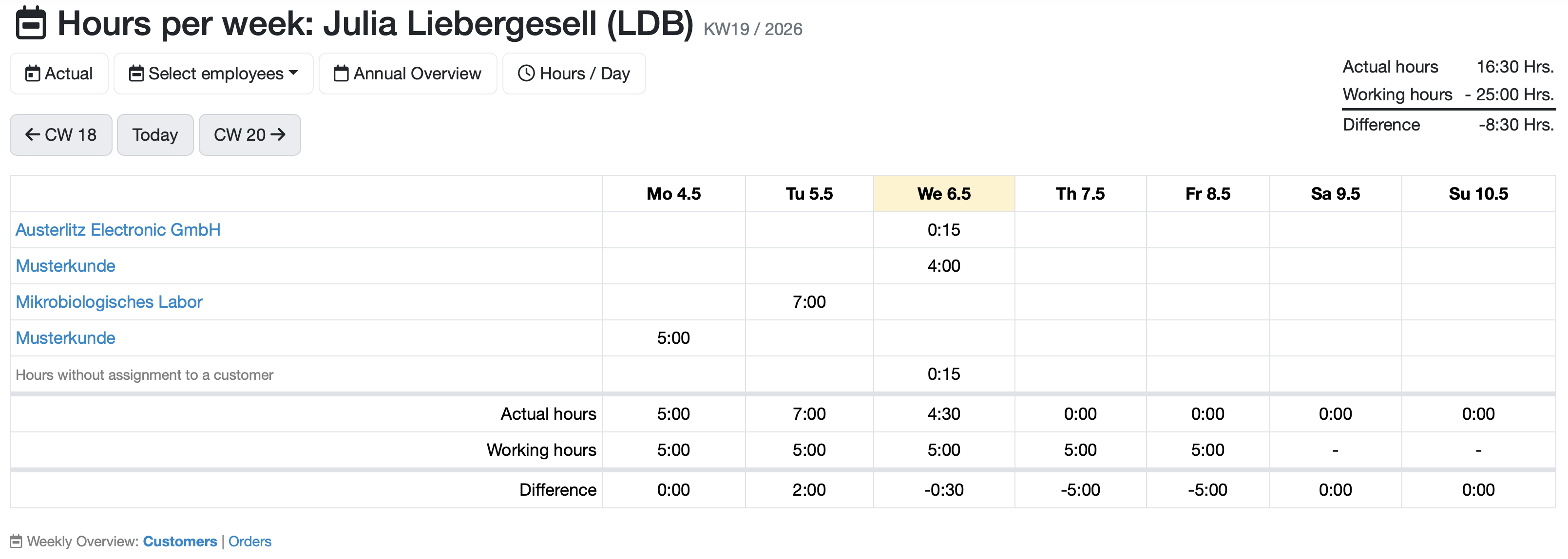
Figure: Weekly hours overview
Three summary rows are displayed at the bottom of the table:
-Use the Weekly Overview: Customers | Orders link below the table to switch the display between grouping by customers and grouping by orders. The currently active mode is displayed in bold.
##Related Topics:
Laatste wijziging: 21.08.2026
Algemeen
Leveranciersbeoordeling
Materiaal
Medewerkers
Klanten
Opdrachten
Monsters
PDF-sjablonen
Bijlagen
Recepten
Verslagen
Editor voor rapporttabellen
Interfaces
Kompetenzen
AI-functies
Inleidende fase
Analyses
Sjablonen
Klantenportaal (optioneel)
Aanbiedingen
Facturen
Parameters
Rekenwerk met parameters
Webservices
Transformatiecode
Controleplannen / Grenswaarden / Specificaties
Documentbeheer
Vragen en antwoorden
Testmiddelen
Opleidingen voor medewerkers
8D-rapport
Overige
Bestandsbeheer
Processen
