You can find the employee management at:
Navigation bar → Settings → Manage employees.
The image shows what the employee management page looks like. The functions are described below.
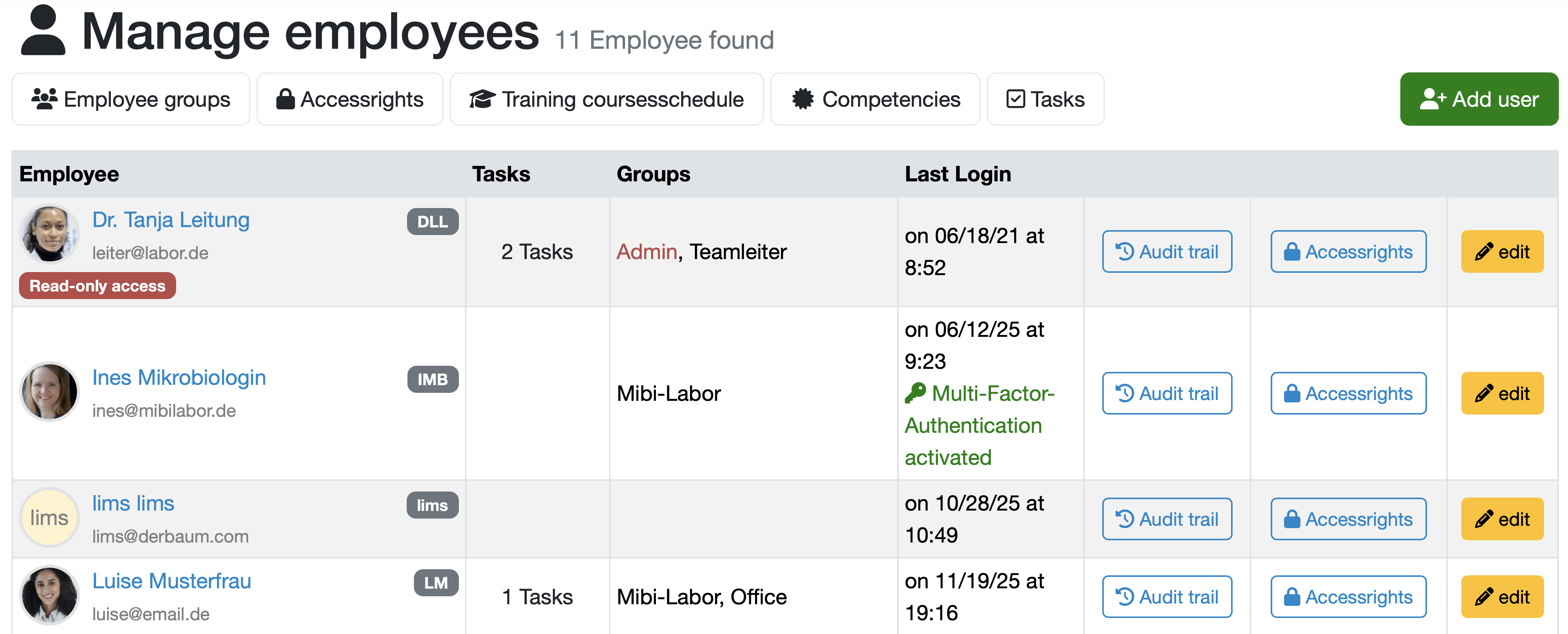
All employees are displayed in a tabular overview that includes the following columns:
Employee: Displays the profile picture, name, email address, and if applicable, an account type (e.g., Read-only access) of the respective employee.
Additionally, the respective abbreviations are shown with a gray background.
Tasks: Shows the number of open tasks for the respective employee.
Groups: Shows the employee's group membership.
Last Login: Shows the date and time of the employee's last login to the LDB. Additionally, it is shown here in green text whether Multi-Factor-Authentication activated for the login.
Actions: The last 3 columns provide quick access to the functions Audit trail, Accessrights and edit via buttons.
Note: You can only see and use those functions for which you have the corresponding Accessrights.
The following additional functions are available via the tabs at the top of the screen:
Employee groups: Management of employee groups
Accessrights: Manage access rights
Training coursesschedule: Planning and overview of training sessions
Competencies: Management of employee competencies
Tasks: Task management for employees
The management of usage licenses can also be found in the employee management. You can find this function in the upper area of the page if you have the access right Add user.
The following image shows an overview of the license management.

The usage licenses are divided into two categories: Standard licenses and Readonly licenses.
For both license types, the number of currently included usage licenses as well as the licenses already in use are displayed.
The minimum number of usage licenses is the maximum number of active users or the agreement according to the license contract.
If all currently included usage licenses are in use and you want to add another employee, you will receive a notification.
Note: Once activated, the employee can log in to the LDB again with their existing credentials.
Laatste wijziging: 21.08.2026
Algemeen
Leveranciersbeoordeling
Materiaal
Medewerkers
Klanten
Opdrachten
Monsters
PDF-sjablonen
Bijlagen
Recepten
Verslagen
Editor voor rapporttabellen
Interfaces
Kompetenzen
AI-functies
Inleidende fase
Analyses
Sjablonen
Klantenportaal (optioneel)
Aanbiedingen
Facturen
Parameters
Rekenwerk met parameters
Webservices
Transformatiecode
Controleplannen / Grenswaarden / Specificaties
Documentbeheer
Vragen en antwoorden
Testmiddelen
Opleidingen voor medewerkers
8D-rapport
Overige
Bestandsbeheer
Processen
