insert ... If the parameter already exists (i. e. it is selected for the sample) and nothing is entered, the new value is inserted. (The result of a given formula does not count as an entry. The value is imported anyway. ) If the parameter does not yet exist, the parameter is selected by the import and the new value is saved.
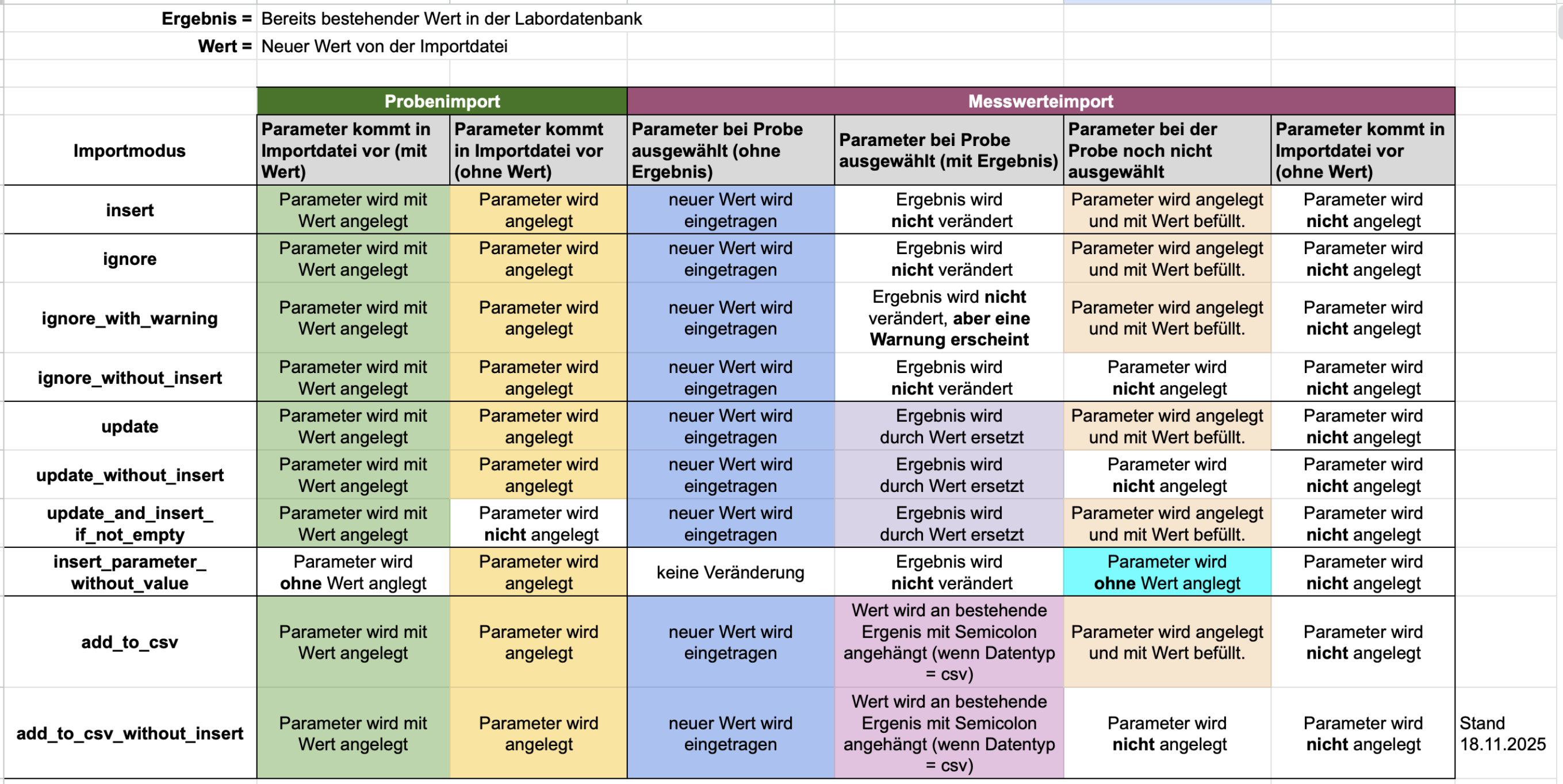
ignore ... If the parameter already exists and nothing is entered, the new value is inserted. If the parameter already exists and something is entered, the new value is ignored. If the parameter does not yet exist, the parameter is created and the new value is saved.

ignore_with_warning ... As above, but there is a warning if a value was already entered.
ignore_without_insert ... If the parameter already exists and nothing is entered, the new value is inserted. If the parameter already exists and something is entered, the new value is ignored. If the parameter does not yet exist, the parameter is not created.

update (default) ... The new value is imported in any case. If the parameter does not yet exist, it is created by the import. If there is already an existing value, it is overwritten by the new value.

update_without_insert ... The value is imported only if the parameter already exists. If there is already an existing value, it is overwritten by the new value.

insert_parameter_without_value... The parameter in question is created, but no values are imported.
Attach to CSV series... The new value is appended to the end of a CSV number series. If the parameter does not yet exist, the parameter is created by the import and the value is saved.
Important: the parameter must use the csv data type. See: Parameter data types
Attach to CSV number series (without creating)... The values are only imported if the parameter already exists. The new value is appended to the end of a CSV number series. If the parameter does not yet exist, no values are stored.
Important: the parameter must use the csv data type. See: Parameter data types
Laatste wijziging: 21.08.2026
Algemeen
Leveranciersbeoordeling
Materiaal
Medewerkers
Klanten
Opdrachten
Monsters
PDF-sjablonen
Bijlagen
Recepten
Verslagen
Editor voor rapporttabellen
Interfaces
Kompetenzen
AI-functies
Inleidende fase
Analyses
Sjablonen
Klantenportaal (optioneel)
Aanbiedingen
Facturen
Parameters
Rekenwerk met parameters
Webservices
Transformatiecode
Controleplannen / Grenswaarden / Specificaties
Documentbeheer
Vragen en antwoorden
Testmiddelen
Opleidingen voor medewerkers
8D-rapport
Overige
Bestandsbeheer
Processen
