This page allows you to configure the details of a single column in a report table. Here, you can customize all formatting options, data sources, and layout settings for a specific column.
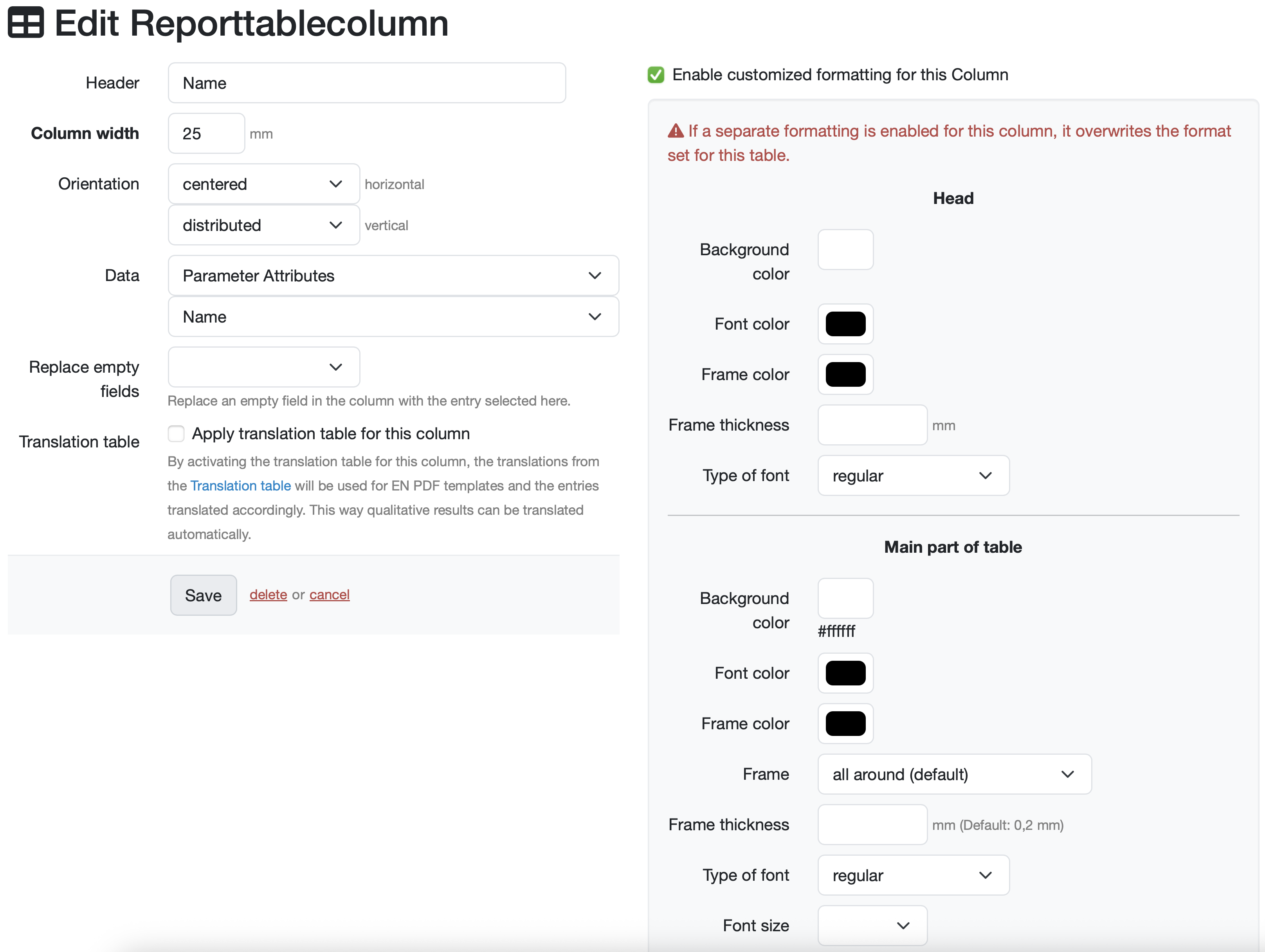
Replace empty fields (dropdown selection): Select the entry that replaces an empty field in the column.
☑ Enable customized formatting for this Column (checkbox): Check the box to activate the customized formatting option for this column.
🔺 If a separate formatting is enabled for this column, it overwrites the format set for this table.
Related topics: Create/edit/delete a report table
Laatste wijziging: 21.08.2026
Algemeen
Leveranciersbeoordeling
Materiaal
Medewerkers
Klanten
Opdrachten
Monsters
PDF-sjablonen
Bijlagen
Recepten
Verslagen
Editor voor rapporttabellen
Interfaces
Kompetenzen
AI-functies
Inleidende fase
Analyses
Sjablonen
Klantenportaal (optioneel)
Aanbiedingen
Facturen
Parameters
Rekenwerk met parameters
Webservices
Transformatiecode
Controleplannen / Grenswaarden / Specificaties
Documentbeheer
Vragen en antwoorden
Testmiddelen
Opleidingen voor medewerkers
8D-rapport
Overige
Bestandsbeheer
Processen
