Overview
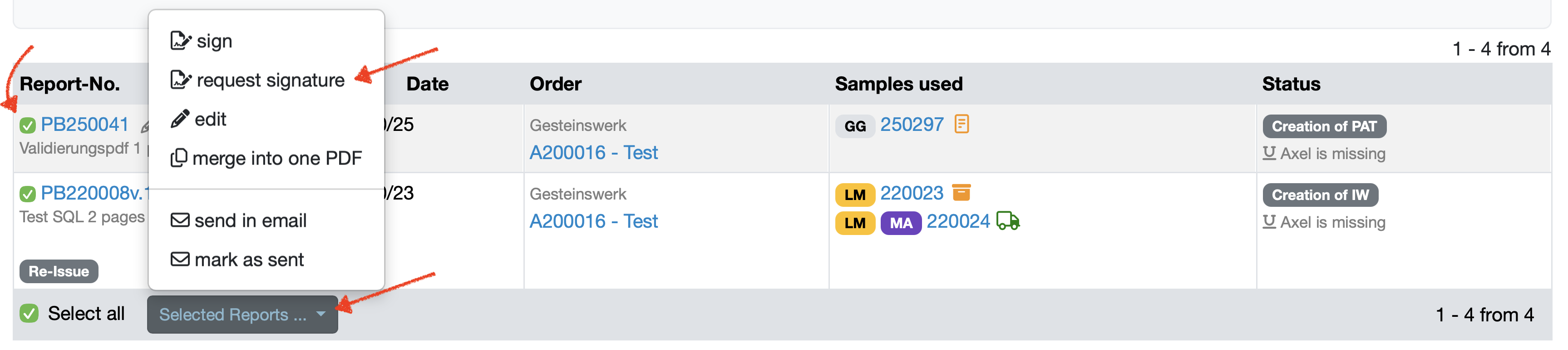
This manual describes the systematic process for requesting signatures for lab reports via e-mail, including selecting reports, customizing e-mail templates, and sending them to selected signatories.
Subject: “Laboratory database signature request” is pre-filled by default. However, you can customize this.
Status of reports: Select the status of the reports from the drop-down menu. The status appears in the e-mail notification as a note.
Signature: Use the drop-down menu to select which account should provide the signature. The e-mail notification is automatically sent to the account of the selected signature.
You can choose from the signatures stored in the signature management system.

The table lists all reports that are ready for signature. It contains the following columns:
Report No.: Shows the unique number of the report.
Customer: Name of the associated customer.
Email template: A specific e-mail template can be stored for each report. By selecting an e-mail template, the report is automatically sent with this e-mail template when signed.
Email template options:
A predefined message text is suggested in the large text field.
You can use the suggested e-mail content or customize it.
The predefined text contains the following elements:
Direct signature link: The recipient receives a link in the e-mail that takes them directly to the signature function for the selected reports.
Report list: List of all reports intended for signature with their numbers and the names of the customers
Signature in the greeting: The current user is automatically suggested.
Send signature request: Click this button to send the e-mail to the selected signatory.
In the report overview, the reports for which a signature request has been sent now have the status Signature requested.
The recipient will receive an e-mail with a link that takes them directly to the signature function for the selected reports.
Laatste wijziging: 21.08.2026
Algemeen
Leveranciersbeoordeling
Materiaal
Medewerkers
Klanten
Opdrachten
Monsters
PDF-sjablonen
Bijlagen
Recepten
Verslagen
Editor voor rapporttabellen
Interfaces
Kompetenzen
AI-functies
Inleidende fase
Analyses
Sjablonen
Klantenportaal (optioneel)
Aanbiedingen
Facturen
Parameters
Rekenwerk met parameters
Webservices
Transformatiecode
Controleplannen / Grenswaarden / Specificaties
Documentbeheer
Vragen en antwoorden
Testmiddelen
Opleidingen voor medewerkers
8D-rapport
Overige
Bestandsbeheer
Processen
