If you want to use measurement repetitions and decide which of the measurements appears on the report, you can use formulas for numerical series. The individual measured values of the measurement repetition are to be treated as a numerical series. To do this, first create at least 2 columns in the corresponding parameter (Add/Edit/Delete Parameter). One column for the measurement results and one for the result that should appear on the report (this must be selected in the report table editor).
In the column for the result, you store a formula that selects which of the values should be chosen. For this, you use the formulas from Calculating with number sequences.
For example, you can store the following formulas (with 2 columns, column 0 contains the final result):
| Highest measured value | max(this(1)) |
| Lowest measured value | min(this(1)) |
| First measured value | first(this(1)) |
| Last measured value | last(this(1)) |
| 2nd measured value | csventry(1, this(1)) |
| Average of all repetitions | mittelwert(this(1)) |
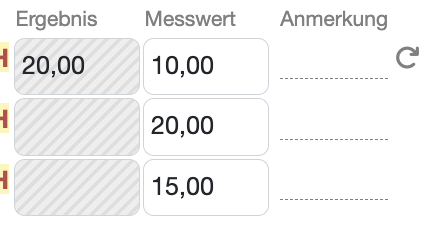
This is how it could look if you always took the highest value:
Laatste wijziging: 21.08.2026
Algemeen
Leveranciersbeoordeling
Materiaal
Medewerkers
Klanten
Opdrachten
Monsters
PDF-sjablonen
Bijlagen
Recepten
Verslagen
Editor voor rapporttabellen
Interfaces
Kompetenzen
AI-functies
Inleidende fase
Analyses
Sjablonen
Klantenportaal (optioneel)
Aanbiedingen
Facturen
Parameters
Rekenwerk met parameters
Webservices
Transformatiecode
Controleplannen / Grenswaarden / Specificaties
Documentbeheer
Vragen en antwoorden
Testmiddelen
Opleidingen voor medewerkers
8D-rapport
Overige
Bestandsbeheer
Processen
