Open the evaluation criteria management via:
Navigation bar → QM → Supplier evaluation → Manage Criteria for supplier evaluation (bottom left, below the overview table)
Note: The exact wording of the menu items may differ depending on the configuration of your LDB.
The criteria management lets you:
Note: All text shown in blue in the table is a clickable link to the respective data type. Some columns and functions are always available, while others depend on your permissions and the configuration of your LDB. The labelling may also be configuration-dependent.
The evaluation criteria are shown in a tabular overview. The following table describes the columns.
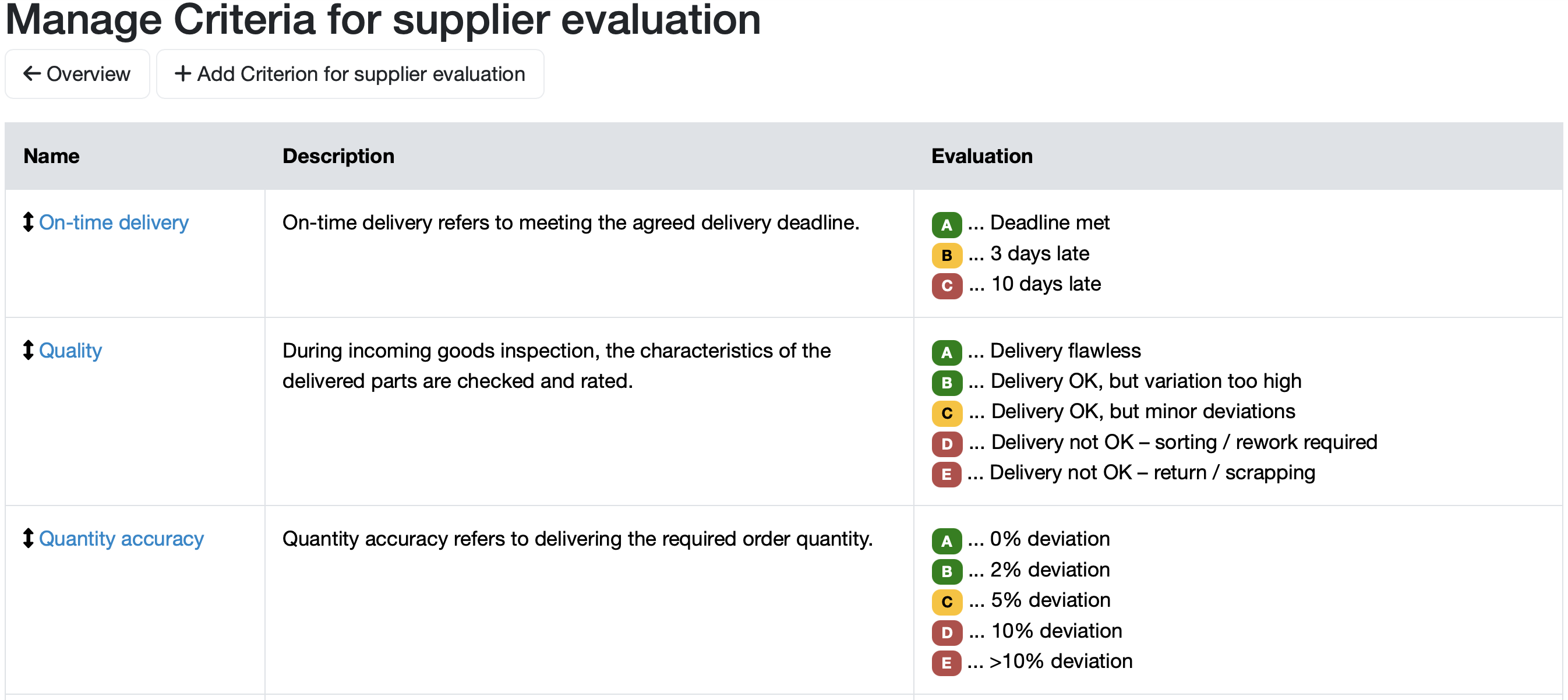
Figure: Overview of the criteria management for supplier evaluation
| Column | Description |
|---|---|
| Criterion | Name of the evaluation criterion (e.g. Termintreue, Qualität, Mengentreue). The name shown in blue is a link to the criterion's edit screen. Using the icon with the up/down arrows to the left of the name, you can change the order via drag and drop. |
| Description | Explanatory text defining what the respective criterion means. Ensures consistent evaluation standards and a uniform application by all employees. |
| Evaluation | Colour-coded rating scheme. Each rating level is assigned a letter (A–E), a colour and an explanatory text. |
Further information: LINK_TO_PAGE= 201
Each criterion is shown with a colour-coded scheme based on the traffic-light principle. The number of levels depends on the configured rating type:
Examples from the figure:
Our recommendation: Provide a clearly worded explanatory text for each level (as in the example). This ensures that all employees evaluate according to the same standards and that the results remain comparable.

Figure: Add Criteria for supplier evaluation
Further information: LINK_TO_PAGE=Edit evaluation criterion for supplier evaluation
Further information: LINK_TO_PAGE=Edit evaluation criterion for supplier evaluation
Define the order in which the criteria are displayed.
Laatste wijziging: 21.08.2026
Algemeen
Leveranciersbeoordeling
Materiaal
Medewerkers
Klanten
Opdrachten
Monsters
PDF-sjablonen
Bijlagen
Recepten
Verslagen
Editor voor rapporttabellen
Interfaces
Kompetenzen
AI-functies
Inleidende fase
Analyses
Sjablonen
Klantenportaal (optioneel)
Aanbiedingen
Facturen
Parameters
Rekenwerk met parameters
Webservices
Transformatiecode
Controleplannen / Grenswaarden / Specificaties
Documentbeheer
Vragen en antwoorden
Testmiddelen
Opleidingen voor medewerkers
8D-rapport
Overige
Bestandsbeheer
Processen
