A description of the latest general additions, changes and corrections to LDB.
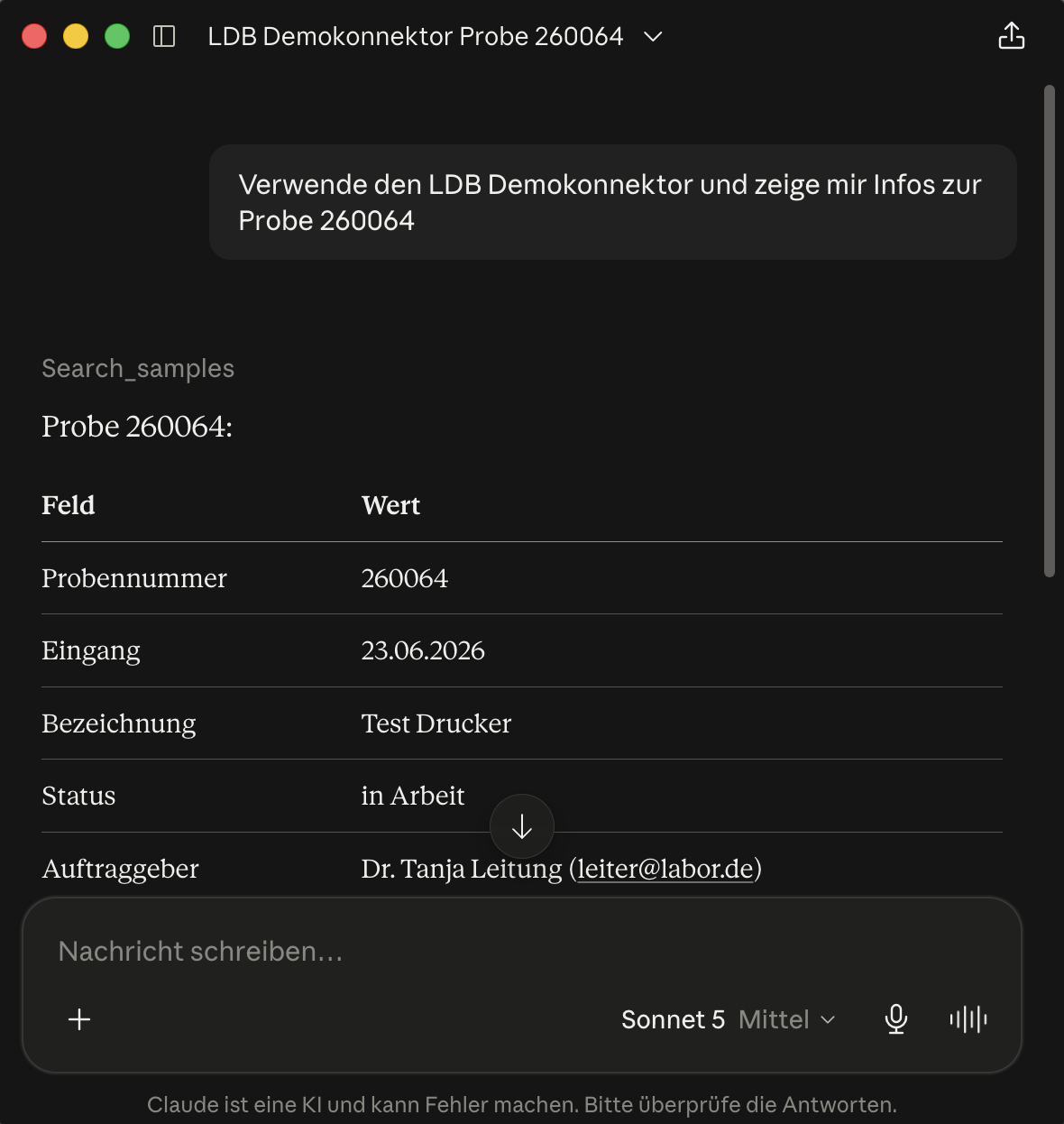 MCP - Model Context Protocol
The Model Context Protocol (MCP) is an open standard that allows AI applications to access external data sources and functions. Simply put, MCP is a unified interface between AI applications such as ChatGPT or Claude and the lab database.
The MCP connection can be specifically enabled for reports and import interfaces. This allows compatible AI applications to retrieve information from the reports made available for this purpose and to transfer data to the lab database via existing import interfaces.
The advantage: Employees can work with up-to-date data from the lab database right within their familiar AI application without having to develop a separate interface for each AI application. Existing reports and import interfaces remain the defined access points, allowing the connection to be used in a controlled and logged manner.
Mark Reissues with AI Support
When reissuing a report, the AI can identify technically relevant changes compared to the signed previous version and suggest editable markings as yellow text highlights to the right of the relevant locations in the PDF.
Query Explorer for Reports
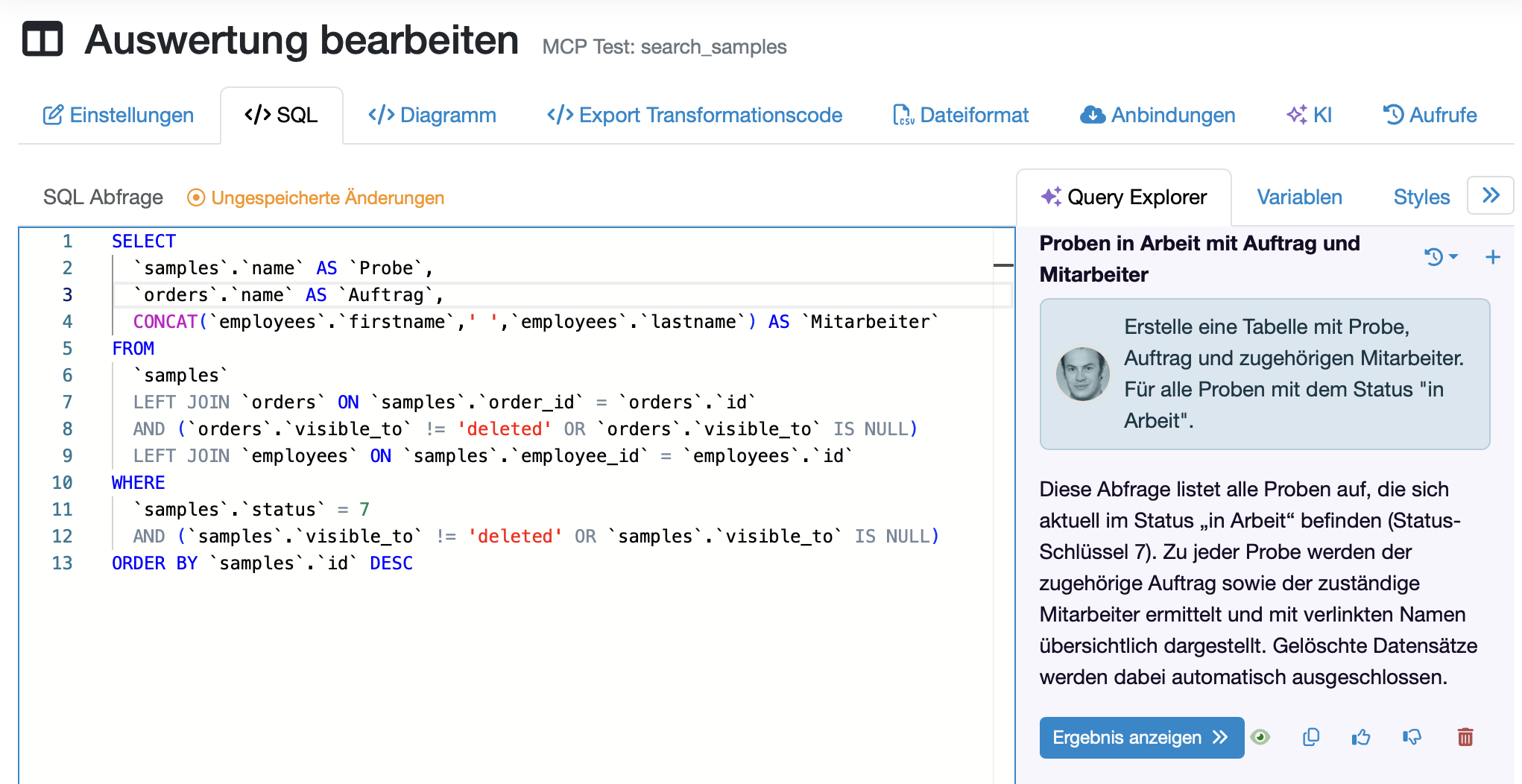
A Query Explorer is now available for reports. Similar to the Code Explorer, an AI model can suggest the appropriate MySQL query based on a description.
The AI automatically receives the database schema as context, along with detailed explanations of the data structure and the relationships between the tables. This enables the AI model to link the correct tables and fields and suggest even more complex database queries.
This makes it possible to create new reports faster and to extend or adapt existing queries more easily.
Optional: Use Your Own AI Connection
If you already have an API key for an AI model such as Claude, GPT, Gemini, or Mistral, you can now enter it in the system settings of your lab database and use your existing AI connection for the lab database.
Additional New Features in This Release
An interdisciplinary team identified and assessed a total of 10 risks associated with feature development and technical changes in this release. Of these, 9 were classified as low and 1 as medium based on the calculation of a risk priority score.
The medium-risk issue concerns the new token authentication for reports, import interfaces, and the MCP connection. If a token falls into the wrong hands, it can be used to gain unauthorized access to the corresponding import or export interface. For better traceability, each token displays when, how often, and from which IP address it was used.
Therefore, treat API tokens like passwords, use time-limited tokens whenever possible, and monitor their usage regularly. In addition, we recommend randomly checking the access rights for particularly sensitive reports after the update.
Audit Assistant
The Audit Assistant answers questions about your quality management system on the basis of your approved QM documents. For this purpose, the QM documents stored in the laboratory database are automatically analyzed, broken down into individual sections and saved in a retrieval augmented generation (RAG) format. If a user asks a question, the AI searches for the relevant document sections and generates the answer, including references to the relevant references in the document.
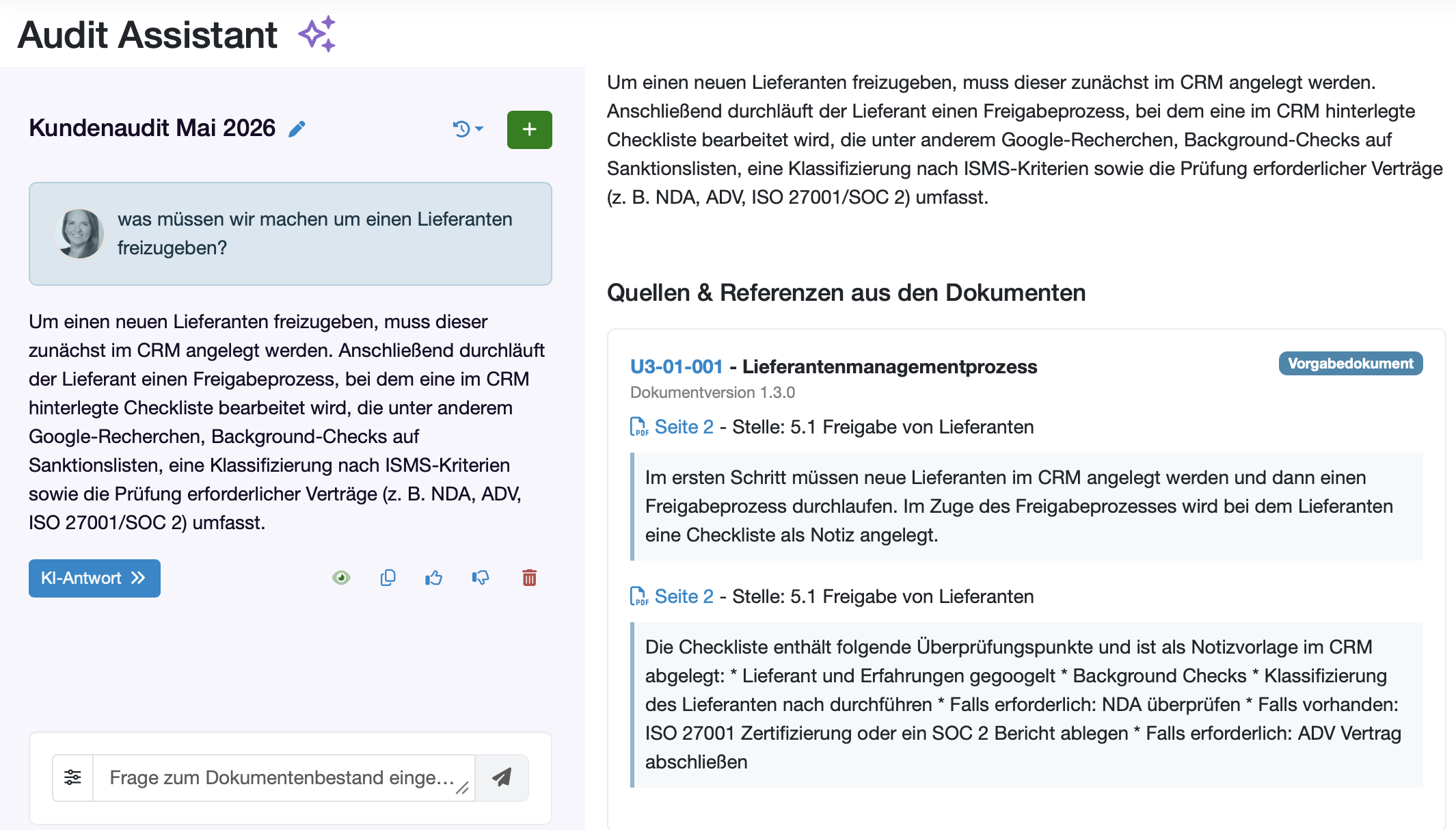
The Audit Assistant is deactivated by default, requires the AI integration of the laboratory database and can be activated in the system settings.
Attention: Audit Assistant answers may contain errors. Please check the answers against the linked references.
Document Explorer
With the Document Explorer, QM documents can be created and revised directly in document control with AI support. This allows drafts to be created more quickly and existing content to be adapted in a targeted manner without leaving document control.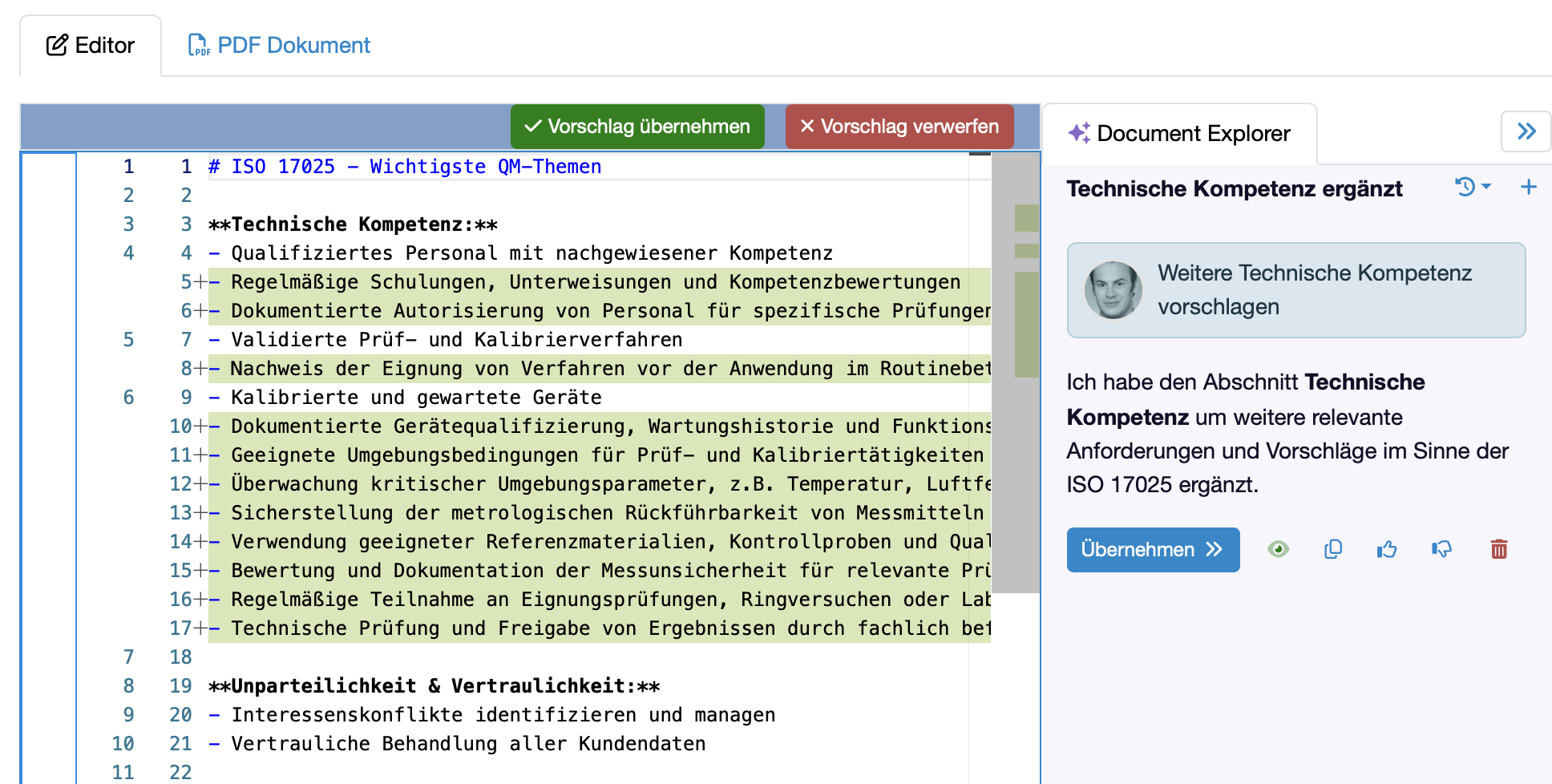
Reporttables with colored columns 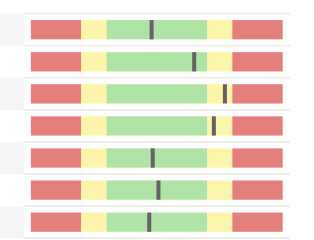
Results can now also be displayed as colored bars in report tables. This allows measured values to be visualized at a glance in relation to target values or limit values.
DEMIS interface
An interface to the German Electronic Reporting and Information System for Infection Protection (DEMIS) has been implemented. This allows reportable findings to be transmitted directly from the laboratory database to the Robert Koch Institute (RKI).
Automatically suggest import mapping with KI
When creating an import interface, the mapping between the data structure of the raw file and the laboratory database data structure can now be automatically suggested by AI. This allows import interfaces to be created quickly and easily.
More new features with this release
In our User call for Summer Release 2026 we will present the listed points to you personally.
An interdisciplinary team identified and assessed 12 risks relating to feature developments and technical changes in this release. Of these, 11 were classified as low risk and 1 as medium risk by calculating a risk priority number.
The medium risk in this release results from the update of the ORM, which relates to the relationships between the data.
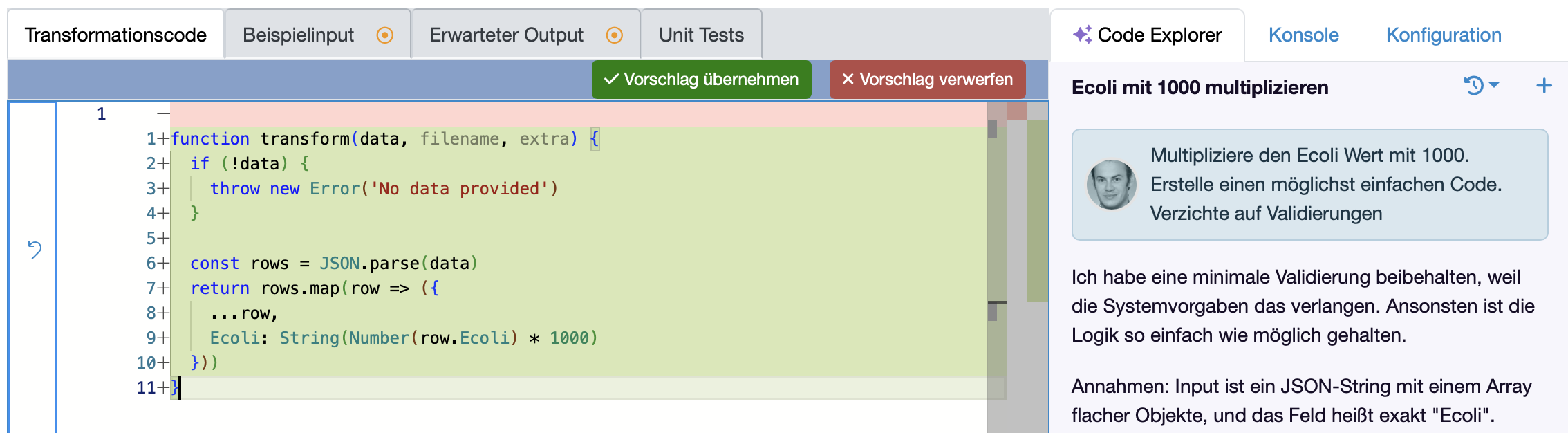
Code Explorer for transformation codes
With the Code Explorer, the transformation code for import interfaces and evaluations can be suggested at the touch of a button using AI models. Based on an example of an input and the desired output, the AI directly suggests the corresponding transformation code.
This allows you to quickly and easily create a transformation code that transforms your imports or evaluations into the required format. You can also use the Code Explorer to ask questions or add extensions to existing transformation codes.
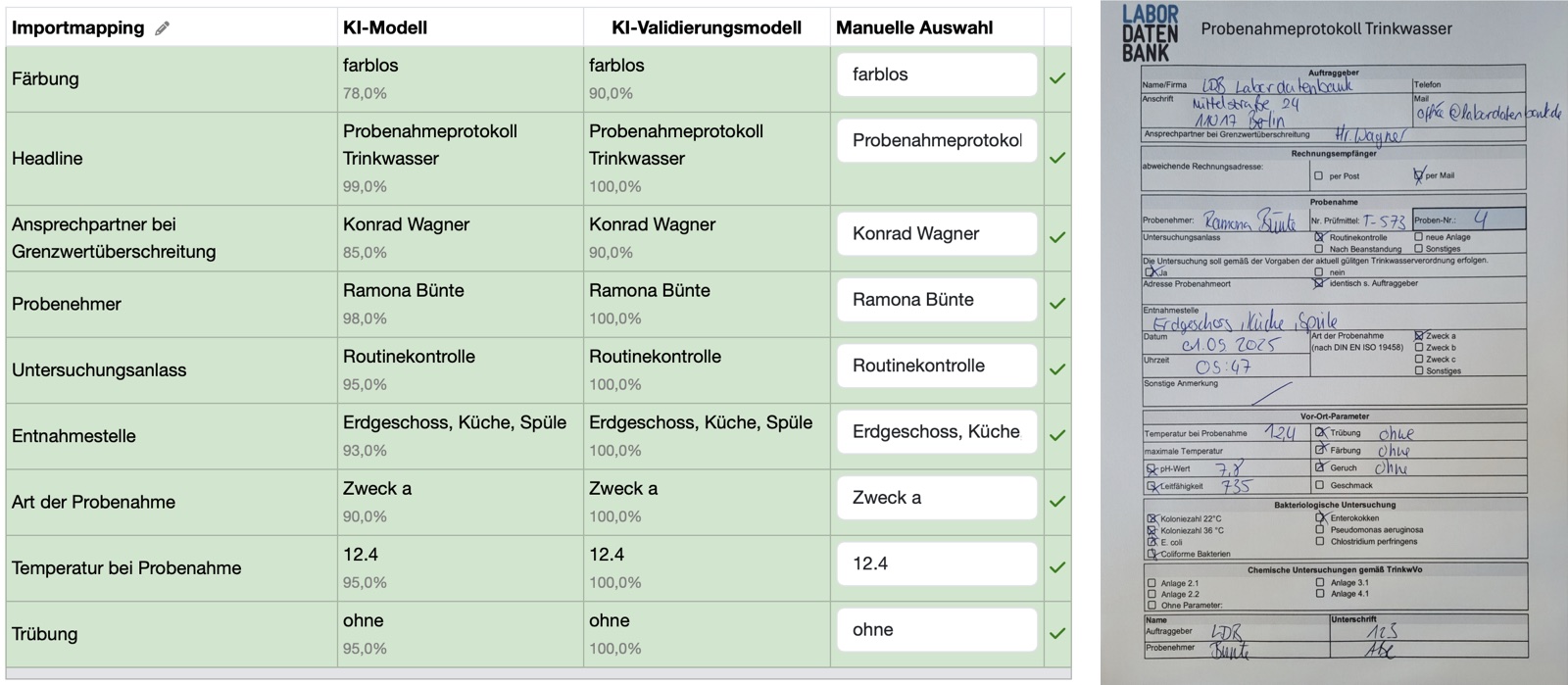
AI import: Validation by multiple AI models
Critical imports can now be imported and validated by two AI models in parallel. The systems check each other and highlight deviations to increase reliability. Quasi in the 4-eyes principle. A confidence value of the AI is also specified for each data field. In the event of deviations between AI import and AI validation or confidence values < 70%, corrections can be made manually.
Extended AI model support
The lab database now supports Claude (Opus 4.6, Sonnet 4.5, Haiku 4.5) in addition to the already integrated GPT, Gemini and Mistral models. This extends the selection options for AI-supported functions AI Explorer, AI Imports, Query Explorer and Code Explorer.
Automated export of stored files as ZIP archive
Stored files can now be automatically transferred to external systems as a ZIP archive via SFTP. The export can be triggered time-controlled or event-based via evaluation.
Conversion of measurement data and sample import to universal import format
All import interfaces have been migrated to a standardized, flexible format. This simplifies future adaptations and extensions and enables import validations in the validation system for your import interfaces.
Parameter types status management & versioning 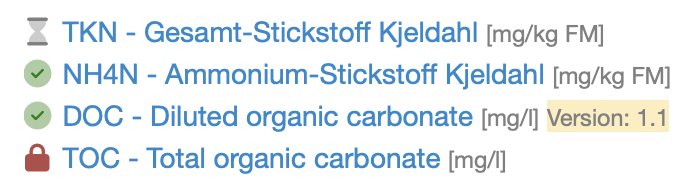
Parameter types can now be versioned and receive complete status management (draft, active, archived). The migration for existing status types will follow in a separate update.
Optimized keyboard navigation
Navigation between parameter fields has been fundamentally revised for faster data entry without a mouse. Tab, Enter and arrow keys now follow the logical field sequence.
Pre-selection of the report date can be set
The default suggested date for report creation can now be configured system-wide or per report type.
DAkkS accreditation & certificate logos
Accreditation notices and certificate logos can now be integrated directly into reports. The positioning and formatting takes into account the DAkkS specifications for the use of the DAkkS logo.
Differentiated note rights
New rights levels for creating and editing notes allow finer access control at sample, order and customer level.
X-Invoice mandatory fields
All fields required for X-Invoice 3.0 are now implemented and validated during invoice creation.
Item numbers and subheadings
Quotations and invoices now support consistent item numbering and structured subheadings for better clarity in large documents.
QM templates for materials & test equipment 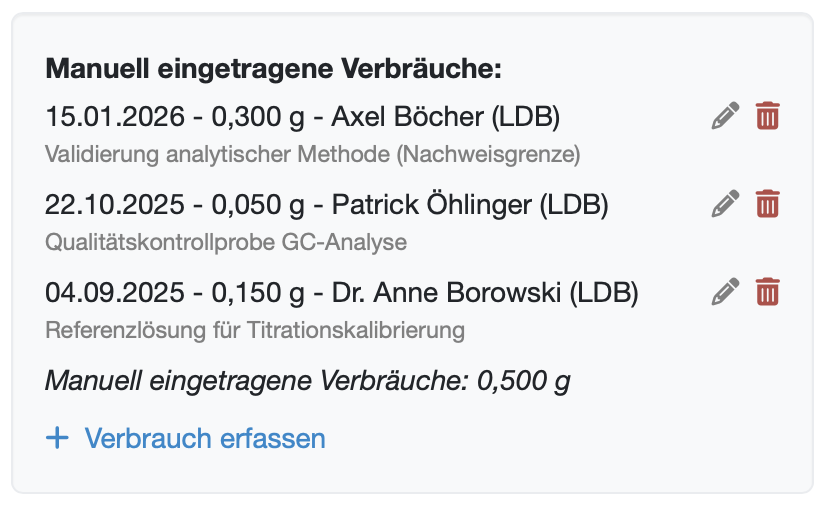
Predefined templates for material testing and test equipment monitoring speed up QM documentation. Templates are based on ISO 17025 and ISO 9001.
In addition, consumption can now be entered directly for batches (even independently of samples). Ideal e.g. in the chemical industry for documenting consumption as a dispensing book for hazardous substances (poison book).
Protection against double-clicking when saving
After clicking on "Save", the saving process is locked, preventing further entries from being created unintentionally by multiple clicks (e.g. double-click).
Data security
Several improvements have been made to data security.
In our user call we will present the points listed in person.
An interdisciplinary team identified and assessed a total of 10 risks for all feature developments in this release. Of these, 9 were classified as low risk and 1 as medium risk by calculating a risk priority number.
The medium risk from the risk assessment report is the conversion of the import interfaces for sample import, measured value import and control value import to the universal format. There is a risk that the existing interfaces will not function as before. The risk was reduced by extensive automated and manual tests, but the recommendation remains that customers carry out random tests in their respective test systems.